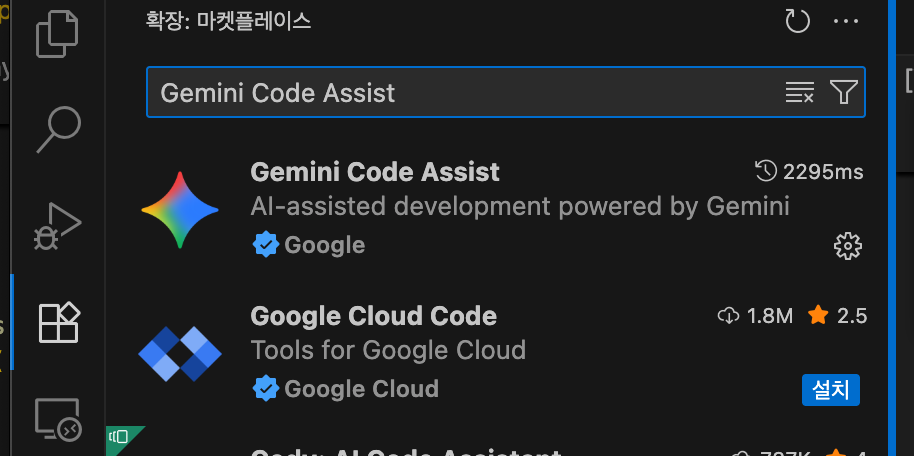
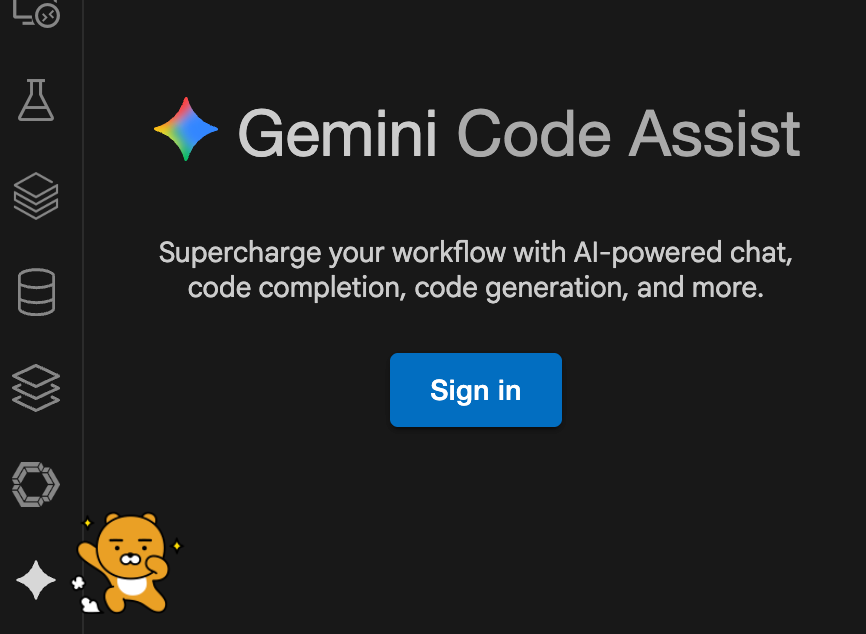
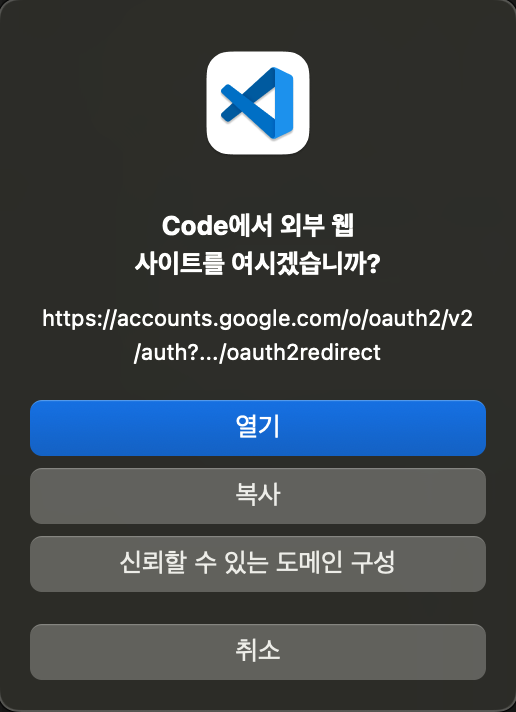
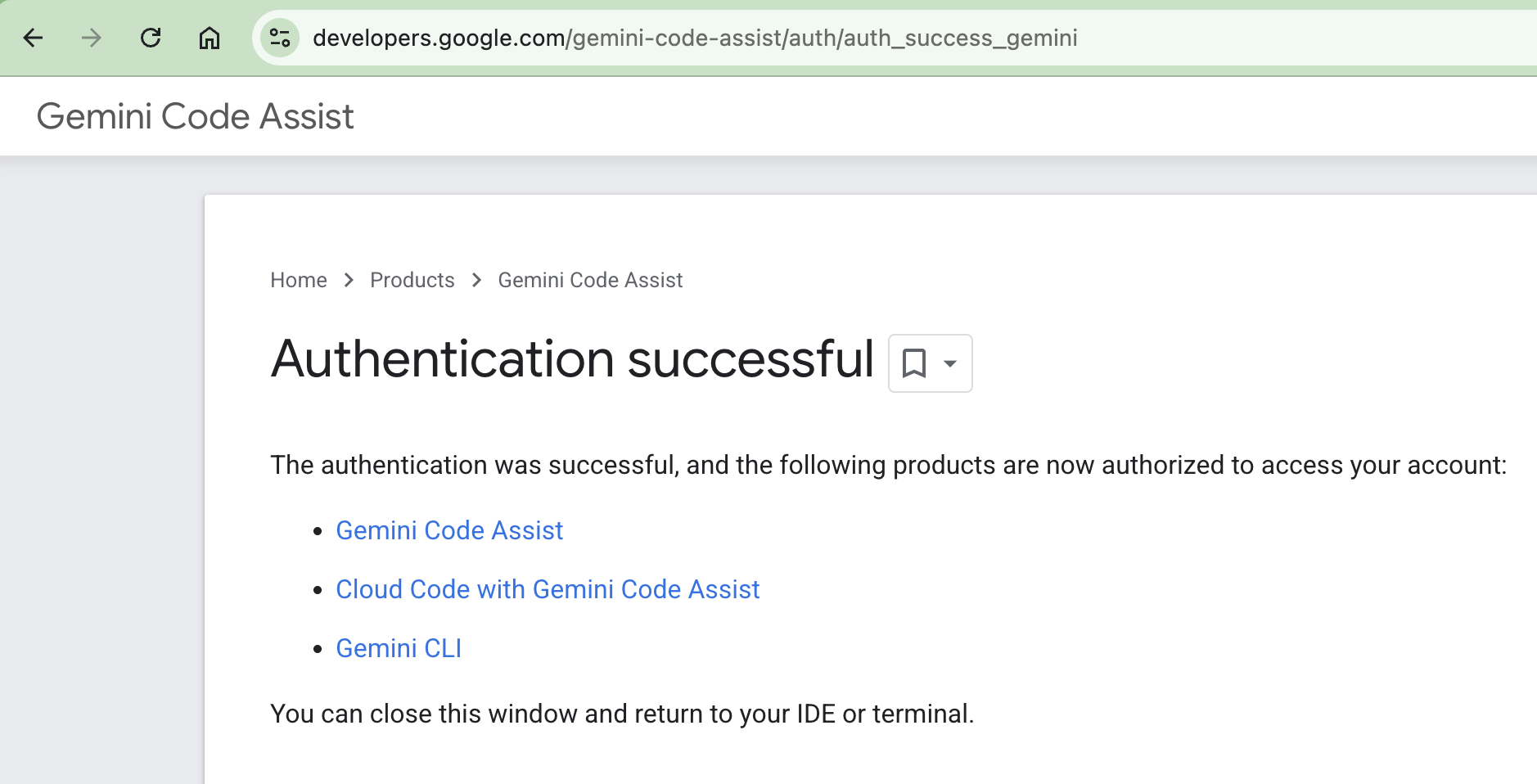
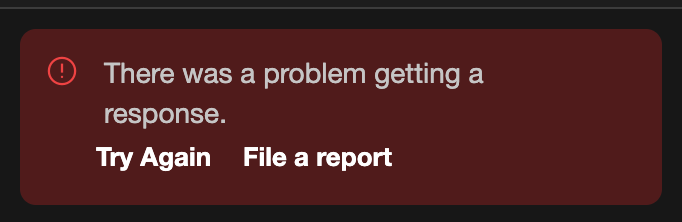
Q. "There was a problem getting a response" 오류가 자주 발생해요. A. 무료 버전(Free Tier) 사용 시, 사용량이 몰리는 시간대에는 API 호출 제한(Rate Limit)이나 서버 부하로 인해 간헐적으로 오류가 발생할 수 있습니다. 이는 유료 버전과의 차이점 중 하나이며, 잠시 후 다시 시도하면 정상적으로 작동합니다.
def section_analysis(self):
    """구간별 분석 (저/중/고)"""
    print("\n📊 구간별 분석")
    print("=" * 50)

    all_numbers = self.loader.get_all_numbers_flat(include_bonus=False)

    # 구간 분류
    low = [n for n in all_numbers if 1 <= n <= 15]    # 저구간
    mid = [n for n in all_numbers if 16 <= n <= 30]   # 중구간
    high = [n for n in all_numbers if 31 <= n <= 45]  # 고구간

    total = len(all_numbers)

    results = {
        '저구간 (1-15)': (len(low), len(low)/total*100),
        '중구간 (16-30)': (len(mid), len(mid)/total*100),
        '고구간 (31-45)': (len(high), len(high)/total*100)
    }

    for section, (count, ratio) in results.items():
        print(f"{section}: {count}회 ({ratio:.2f}%)")

    return results
def odd_even_analysis(self):
    """홀수/짝수 분석"""
    all_numbers = self.loader.get_all_numbers_flat(include_bonus=False)

    odd = [n for n in all_numbers if n % 2 == 1]
    even = [n for n in all_numbers if n % 2 == 0]

    print(f"홀수: {len(odd)}회 ({len(odd)/len(all_numbers)*100:.2f}%)")
    print(f"짝수: {len(even)}회 ({len(even)/len(all_numbers)*100:.2f}%)")
결과:
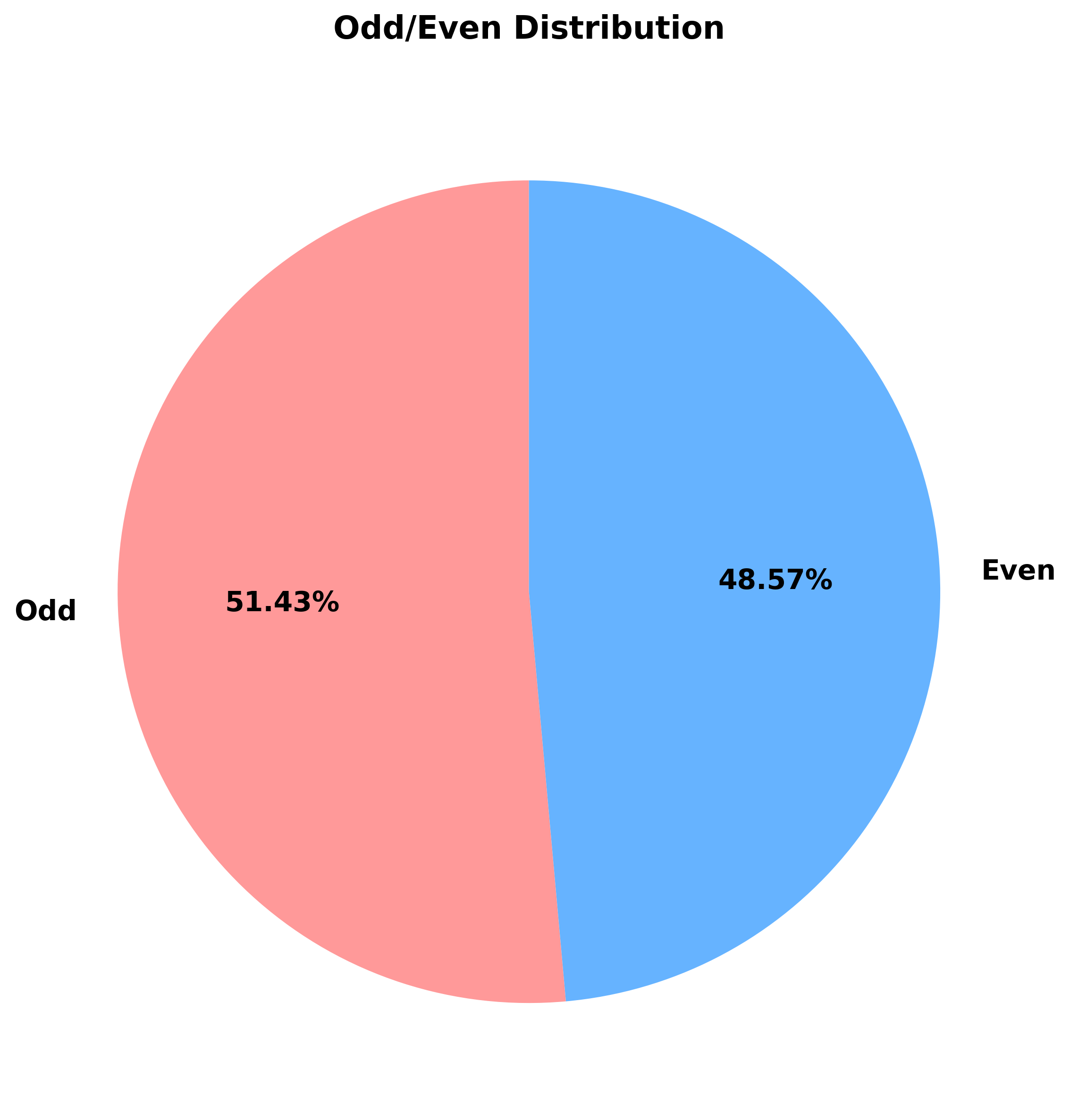
홀수: 1,862회 (51.46%)
짝수: 1,756회 (48.54%)
인사이트:
홀수가 약간 더 많이 출현 (약 3% 차이)
하지만 통계적으로 유의미한 차이는 아님
▲ 홀수/짝수 출현 분포 (거의 50:50)
🎨 시각화: 데이터를 그림으로
숫자만 봐서는 재미가 없다. 시각화를 통해 데이터를 이야기로 만들어야 한다.
matplotlib 한글 폰트 설정
첫 번째 장벽: matplotlib는 기본적으로 한글을 지원하지 않는다.
import matplotlib.pyplot as plt
import matplotlib.font_manager as fm
import platform

# 한글 폰트 설정
def set_korean_font():
    """운영체제별 한글 폰트 설정"""
    system = platform.system()

    if system == 'Darwin':  # macOS
        plt.rc('font', family='AppleGothic')
    elif system == 'Windows':
        plt.rc('font', family='Malgun Gothic')
    else:  # Linux
        plt.rc('font', family='NanumGothic')

    # 마이너스 기호 깨짐 방지
    plt.rc('axes', unicode_minus=False)
✅ 프로젝트 구조 설계 완료 ✅ 데이터 로더 구현 (인코딩 자동 처리) ✅ 기본 통계 분석 완료 (빈도, 구간, 홀짝) ✅ 시각화 시스템 구축 (6개 차트) ✅ 605회차 데이터 분석 완료
흥미로운 발견
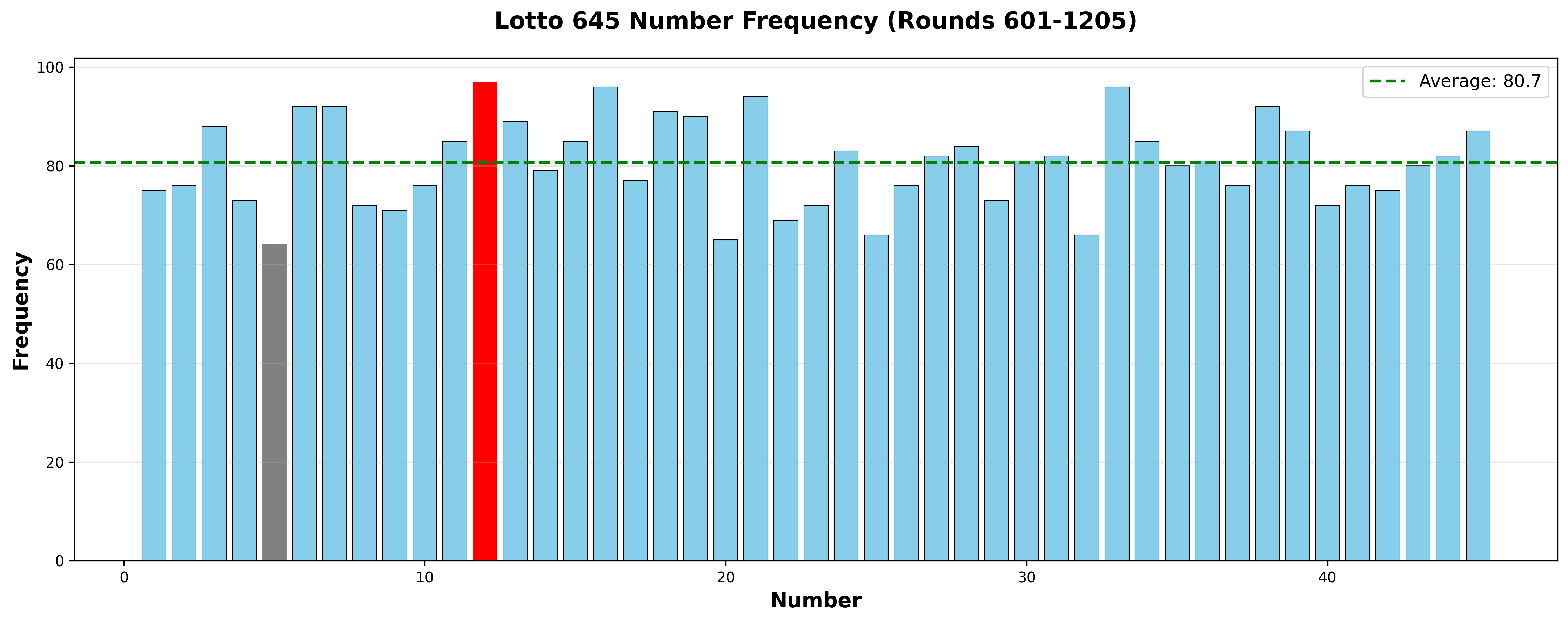
12번이 가장 많이 나왔다 (97회, 16.09%)
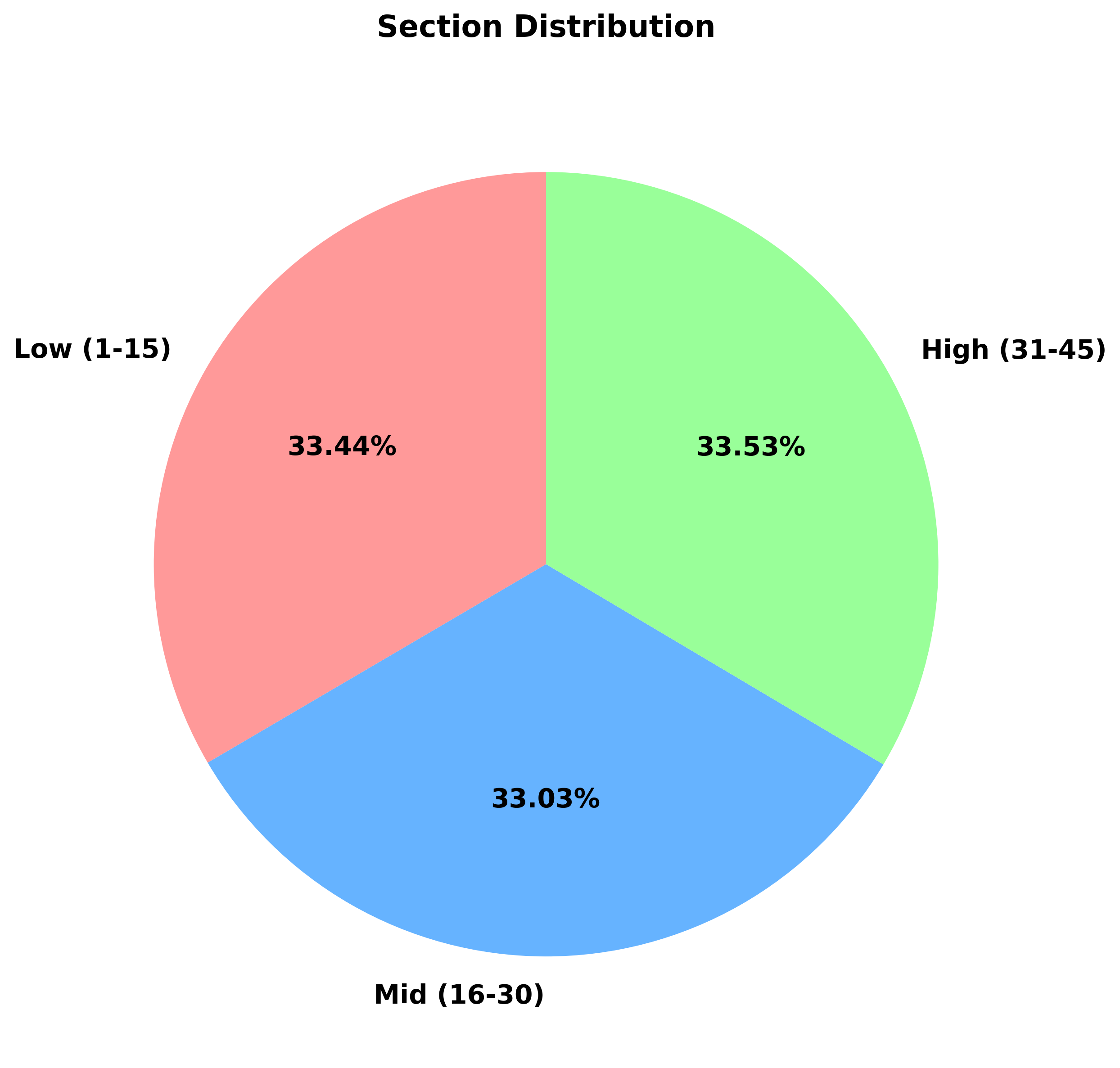
세 구간이 거의 균등하다 (약 33%씩)
홀수가 약간 더 많다 (51.46% vs 48.54%)
최대-최소 차이는 33회 (5.5% 차이)
통계적 의미
605회 추첨에서 45개 번호가 균등하게 나온다면:
기댓값: 605 × 6 ÷ 45 = 80.67회
실제 평균: 74.0회
표준편차: 약 8.5회
결론: 출현 빈도는 통계적으로 정규분포에 가깝다. 로또 추첨의 공정성을 보여준다.
🚀 다음 에피소드 예고
2편: "숫자가 말을 걸 때" - 연속 번호와 그리드 패턴의 비밀
다음 편에서는:
6-7이 왜 15번이나 나왔을까?
7x7 그리드 복권 용지의 비밀
연속 번호 심층 분석
그리드 패턴 기반 새로운 관점
미리보기:
# 연속 번호 찾기
def find_consecutive_groups(numbers):
    groups = []
    for i in range(len(numbers)-1):
        if numbers[i+1] - numbers[i] == 1:
            groups.append((numbers[i], numbers[i+1]))
    return groups

# 결과: 56%의 회차에서 연속 번호 출현!
더 흥미로운 건 그다음이었다. 로또 복권을 사러 갔을 때, 그 작은 용지를 보다가 깨달았다.
"이거... 7x7 그리드잖아?"
1부터 45까지 번호가 7개씩 7줄로 배치되어 있었다. 숫자가 아니라 "위치"로 보면 어떨까? 복권 용지 왼쪽 위 모서리 번호들은 덜 나올까? 중앙 번호들은 더 많이 나올까?
숫자가 말을 걸기 시작했다.
🔢 연속 번호의 비밀
"56%의 회차에서 연속 번호가 나온다"
첫 번째 발견은 충격적이었다.
def find_consecutive_groups(numbers):
    """연속 번호 그룹 찾기"""
    numbers = sorted(numbers)
    groups = []

    i = 0
    while i < len(numbers) - 1:
        if numbers[i+1] - numbers[i] == 1:
            # 연속 시작
            group = [numbers[i], numbers[i+1]]
            j = i + 1

            # 연속이 계속되는지 확인
            while j < len(numbers) - 1 and numbers[j+1] - numbers[j] == 1:
                group.append(numbers[j+1])
                j += 1

            groups.append(group)
            i = j
        else:
            i += 1

    return groups
605회차 전체를 분석한 결과:
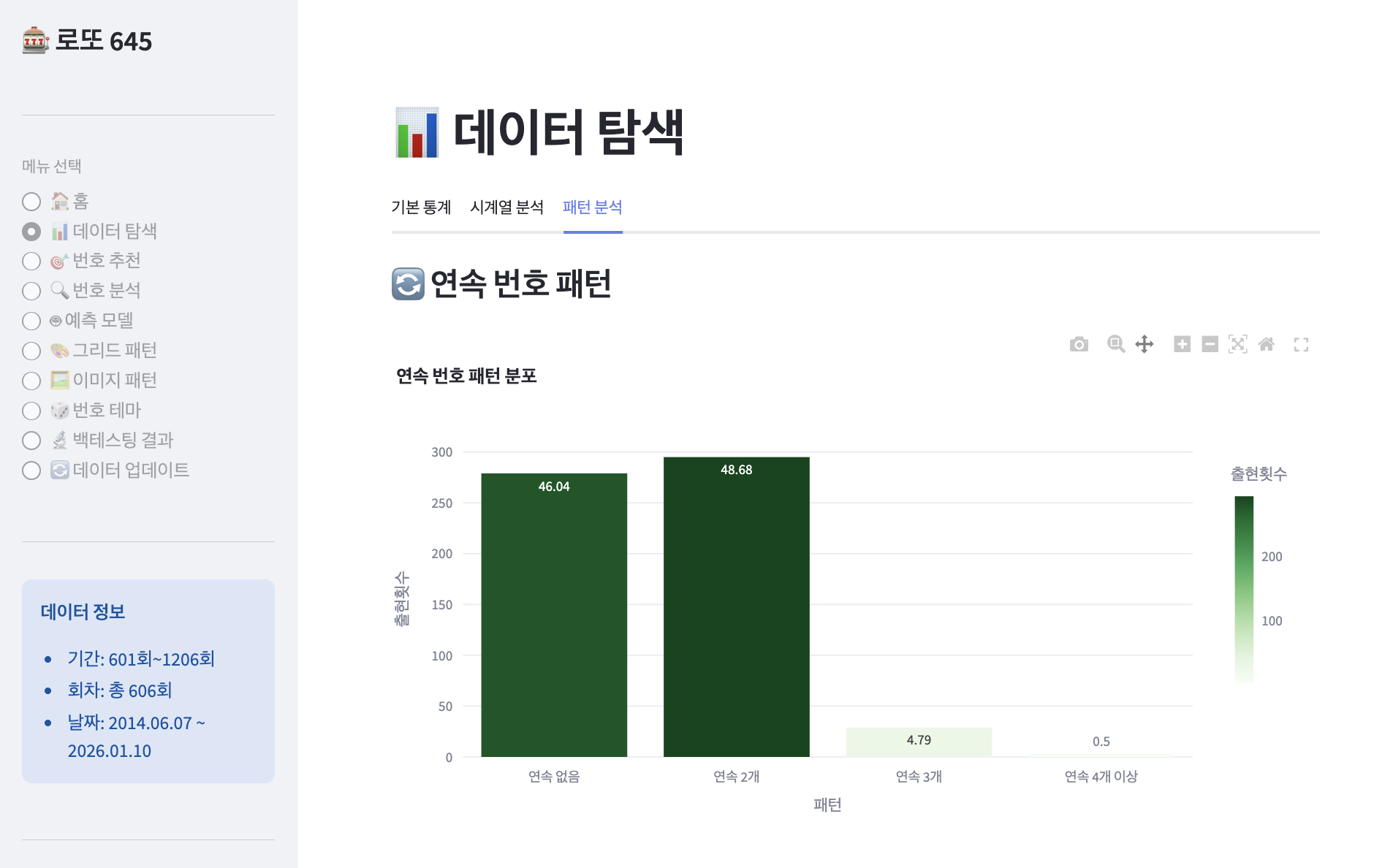
📊 연속 번호 출현 통계
==================================================
연속 없음:    278회 (46.10%)
연속 2개:     339회 (56.22%) ⭐
연속 3개:      30회 ( 4.98%)
연속 4개:       3회 ( 0.50%)
연속 5개 이상:  0회 ( 0.00%)
핵심 발견:
절반 이상(53.9%)에서 연속 번호가 출현!
연속 2개가 가장 흔한 패턴
연속 5개 이상은 단 한 번도 없음
최다 출현 연속 조합 TOP 10
def analyze_consecutive_combinations(self):
    """가장 많이 나온 연속 조합 분석"""
    consecutive_pairs = []

    for _, row in self.loader.numbers_df.iterrows():
        numbers = sorted(row['당첨번호'])

        # 연속 쌍 찾기
        for i in range(len(numbers) - 1):
            if numbers[i+1] - numbers[i] == 1:
                pair = (numbers[i], numbers[i+1])
                consecutive_pairs.append(pair)

    # 빈도 계산
    from collections import Counter
    counter = Counter(consecutive_pairs)

    return counter.most_common(10)
만약 사람들이 복권 용지에서 중앙을 더 자주 선택한다면? 만약 모서리는 덜 선택한다면? 이건 단순한 숫자 분석이 아니라 공간 통계 문제다!
GridPatternAnalysis 클래스 설계
class GridPatternAnalysis:
    """복권 용지 그리드 패턴 분석 클래스"""

    def __init__(self, loader):
        self.loader = loader
        self.rows = 7
        self.cols = 7

        # 번호 → 그리드 좌표 매핑
        self.number_to_position = {}
        number = 1
        for row in range(self.rows):
            for col in range(self.cols):
                if number <= 45:
                    self.number_to_position[number] = (row, col)
                    number += 1

        # 위치별 출현 빈도
        self.position_heatmap = np.zeros((7, 7))

    def get_position(self, number):
        """번호의 그리드 좌표 반환 (row, col)"""
        row = (number - 1) // 7
        col = (number - 1) % 7
        return (row, col)

    def get_zone(self, row, col):
        """그리드 위치의 구역 반환"""
        # 모서리 (4칸): 1, 7, 43, 45
        if (row, col) in [(0, 0), (0, 6), (6, 0), (6, 6)]:
            return "corner"

        # 가장자리 (20칸): 첫/마지막 행/열
        elif row == 0 or row == 6 or col == 0 or col == 6:
            return "edge"

        # 중앙부 (9칸): 17, 18, 19, 24, 25, 26, 31, 32, 33
        elif 2 <= row <= 4 and 2 <= col <= 4:
            return "center"

        # 중간 (12칸): 나머지
        else:
            return "middle"
그리드 구역 분류:
C = Corner (모서리)
E = Edge (가장자리)
M = Middle (중간)
X = Center (중앙부)

C  E  E  E  E  E  C
E  M  M  M  M  M  E
E  M  X  X  X  M  E
E  M  X  X  X  M  E
E  M  X  X  X  M  E
E  M  M  M  M  M  E
C  E  E  .  .  .  .
📊 위치별 출현 빈도 분석
히트맵 생성
def analyze_position_frequency(self):
    """위치별 출현 빈도 분석"""
    # 모든 당첨번호의 위치 수집
    for _, row in self.loader.numbers_df.iterrows():
        winning_numbers = row['당첨번호']
        for num in winning_numbers:
            r, c = self.get_position(num)
            self.position_heatmap[r, c] += 1

    # 통계
    valid_freqs = []
    for number in range(1, 46):
        r, c = self.get_position(number)
        freq = self.position_heatmap[r, c]
        valid_freqs.append((freq, r, c, number))

    valid_freqs.sort(reverse=True)

    max_freq, max_r, max_c, max_num = valid_freqs[0]
    min_freq, min_r, min_c, min_num = valid_freqs[-1]

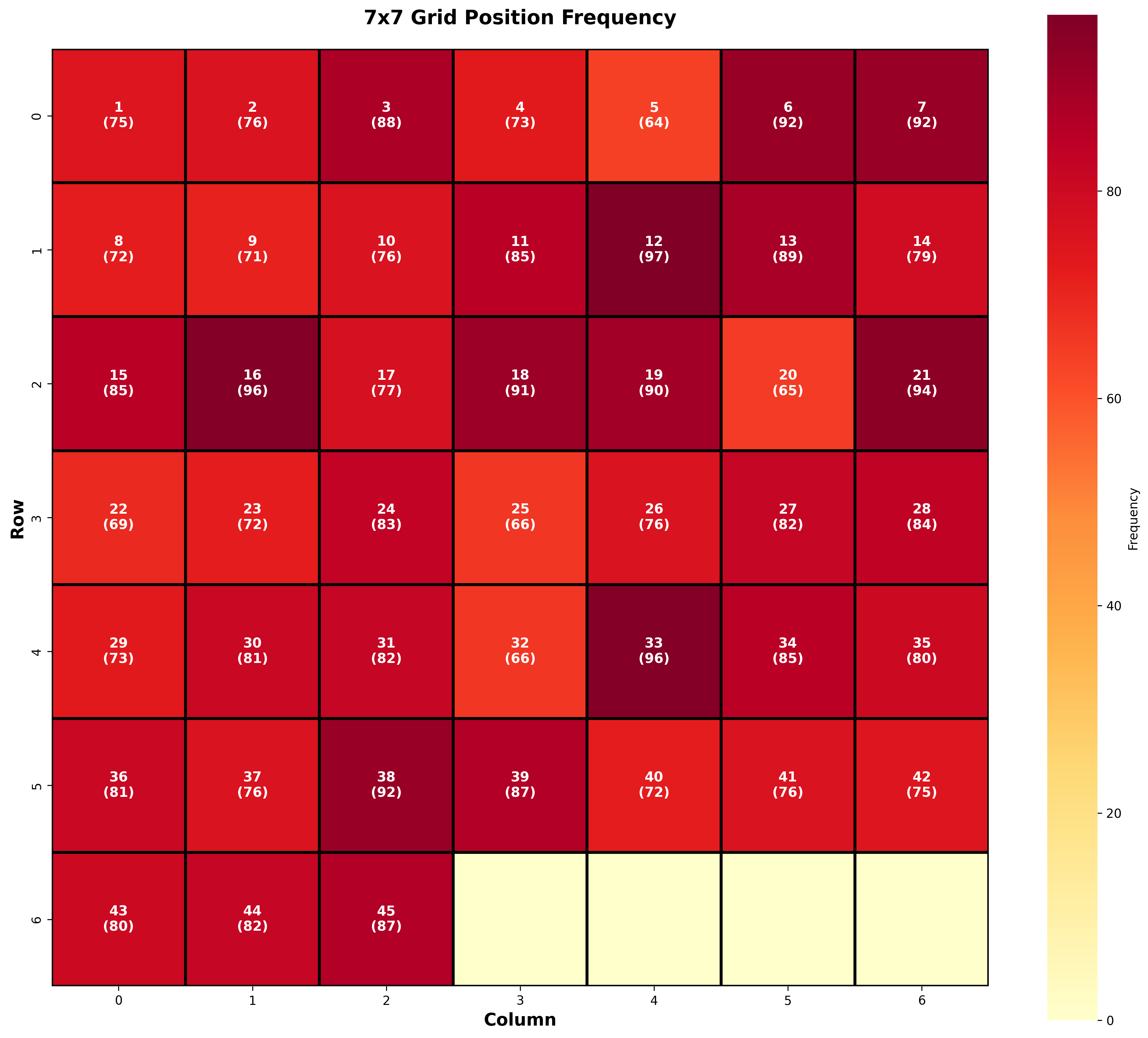
    print(f"🔥 최다 출현: Row {max_r}, Col {max_c} (번호 {max_num}) - {int(max_freq)}회")
    print(f"❄️  최소 출현: Row {min_r}, Col {min_c} (번호 {min_num}) - {int(min_freq)}회")
    print(f"📊 평균 출현: {np.mean(self.position_heatmap):.1f}회")
결과:
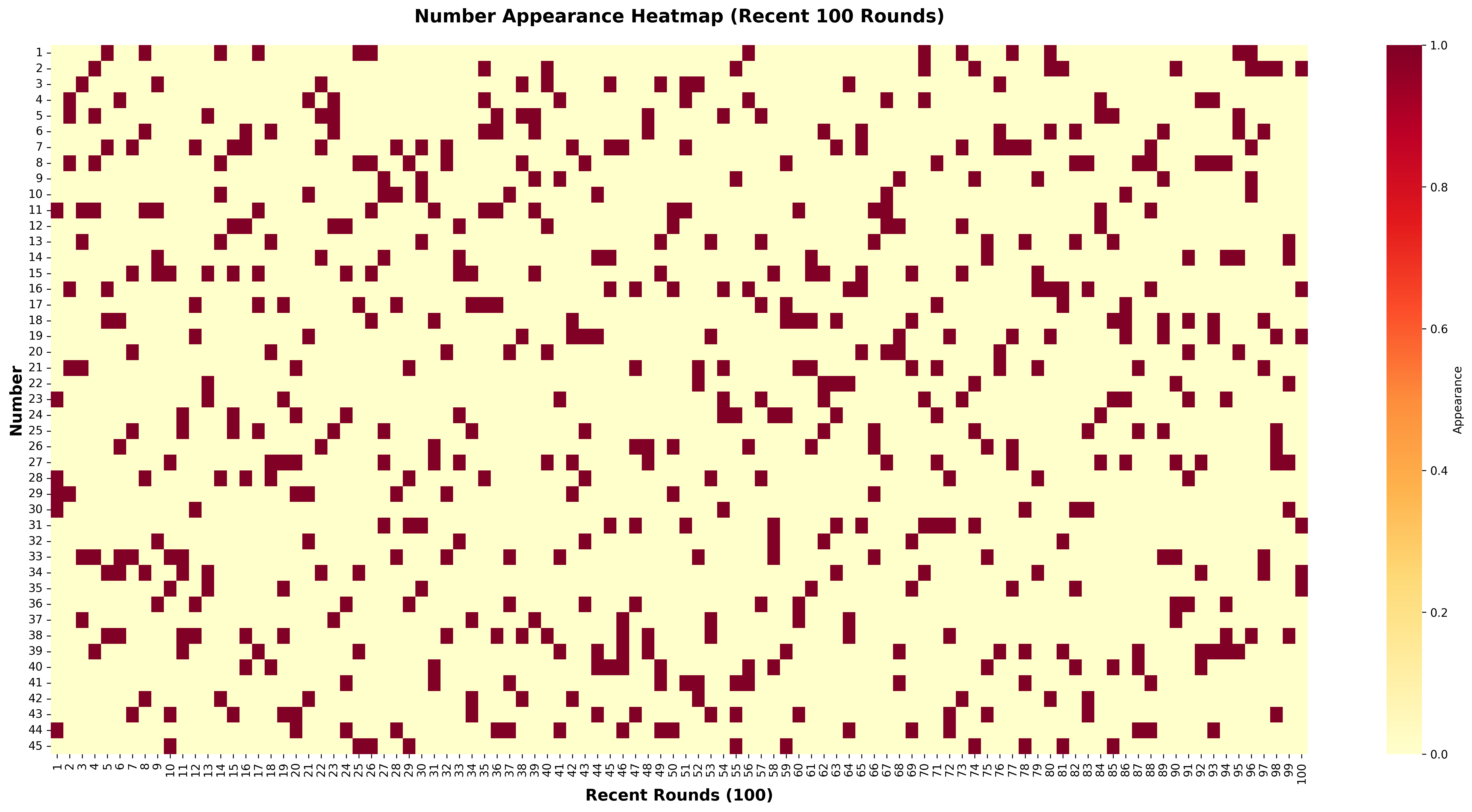
🔥 최다 출현: Row 1, Col 4 (번호 12) - 97회
❄️  최소 출현: Row 0, Col 4 (번호 5) - 64회
📊 평균 출현: 74.0회
▲ 7x7 그리드 위치별 출현 빈도 히트맵(Heatmap) - 진한 색: 많이 출현
인사이트:
최대-최소 차이: 33회 (약 51% 차이!)
12번(Row 1, Col 4)이 압도적 1위
5번(Row 0, Col 4)이 최하위
🏘️ 구역별 분석
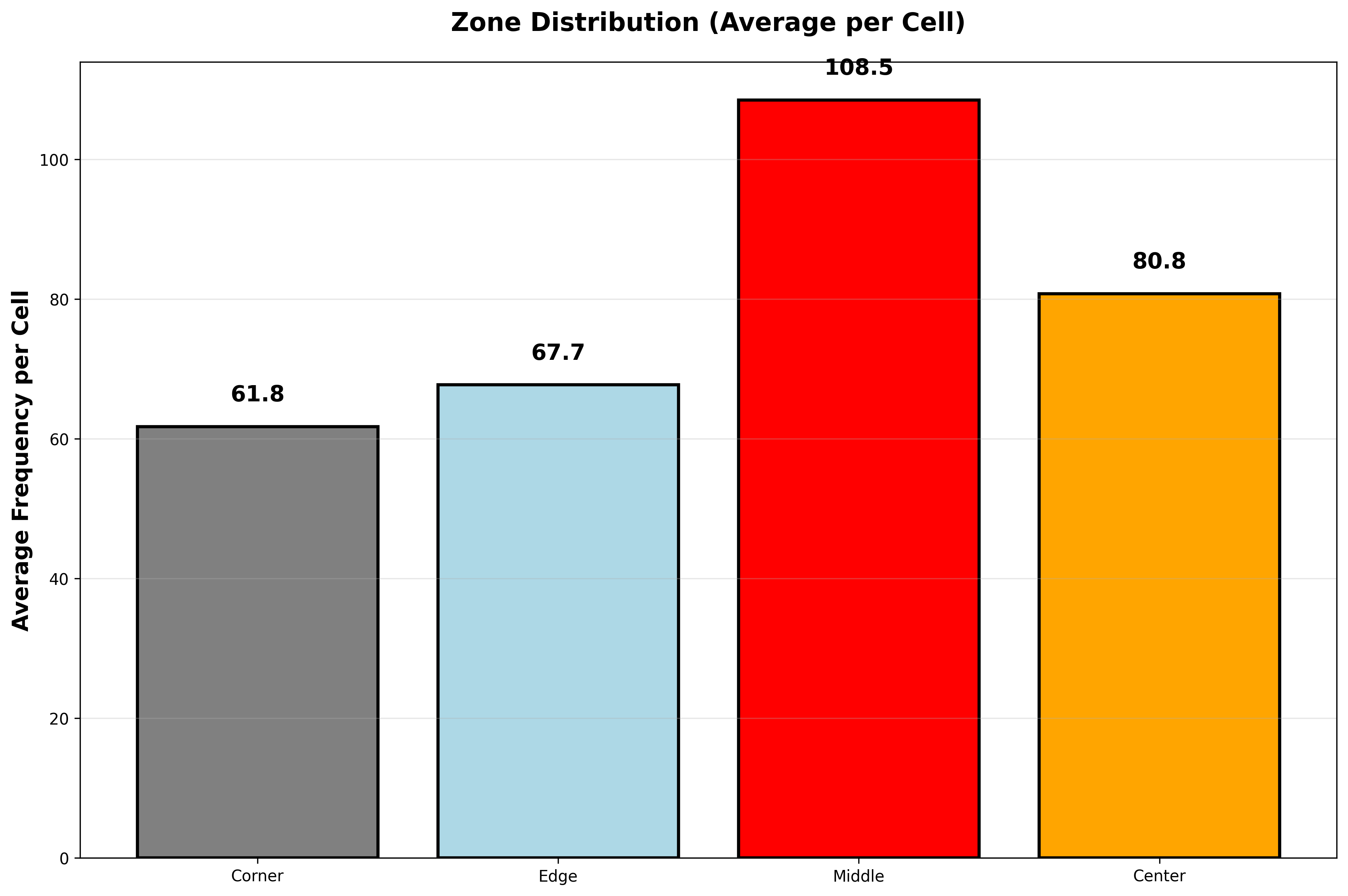
각 구역의 평균 출현 횟수
def analyze_zone_distribution(self):
    """구역별 분포 분석"""
    zone_counts = defaultdict(int)
    zone_cells = defaultdict(int)

    for number in range(1, 46):
        r, c = self.get_position(number)
        zone = self.get_zone(r, c)
        freq = self.position_heatmap[r, c]

        zone_counts[zone] += freq
        zone_cells[zone] += 1

    # 구역별 평균
    results = {}
    for zone in ['corner', 'edge', 'middle', 'center']:
        total = zone_counts[zone]
        cells = zone_cells[zone]
        avg = total / cells if cells > 0 else 0
        results[zone] = {
            'cells': cells,
            'total': total,
            'avg_per_cell': avg,
            'ratio': total / sum(zone_counts.values()) * 100
        }

    return results
결과:
구역
칸 수
출현 횟수
비율
1칸당 평균
모서리 (Corner)
4칸
246회
6.79%
61.5회 ❌
가장자리 (Edge)
20칸
1,353회
37.33%
67.7회
중간 (Middle)
12칸
1,299회
35.84%
108.3회 ✅
중앙부 (Center)
9칸
726회
20.03%
80.7회
▲ 구역별(Zone) 번호 출현 분포 - 1칸당 평균(Avg per Cell) 비교
핵심 발견:
🏆 중간 영역(12칸)이 1칸당 108.3회로 최고!
❌ 모서리(4칸)는 61.5회로 최저
📈 중간 영역이 모서리보다 76% 더 많이 출현
왜 중간 영역일까?
추측 1: 사람들이 복권 용지를 볼 때 시선이 중간으로 집중 추측 2: 모서리 번호(1, 7, 43, 45)는 심리적으로 극단적 느낌 추측 3: 중간 영역은 시각적으로 편안한 위치
📐 공간적 군집도 분석
맨해튼 거리(Manhattan Distance) 계산
당첨번호(Winning Numbers) 6개가 복권 용지 위에 얼마나 분산되어 있을까?
def calculate_spatial_distance(self, numbers):
    """번호들 간의 평균 맨해튼 거리(Manhattan Distance) 계산"""
    distances = []

    for i, n1 in enumerate(numbers):
        for n2 in numbers[i+1:]:
            r1, c1 = self.get_position(n1)
            r2, c2 = self.get_position(n2)

            # 맨해튼 거리 = |x1-x2| + |y1-y2|
            dist = abs(r1 - r2) + abs(c1 - c2)
            distances.append(dist)

    return np.mean(distances)
맨해튼 거리란?
예: 번호 1(0,0)과 번호 45(6,6)의 거리
= |0-6| + |0-6|
= 6 + 6
= 12 (최대 거리)

예: 번호 6(0,5)과 번호 7(0,6)의 거리
= |0-0| + |5-6|
= 0 + 1
= 1 (연속 번호)
605회차 분석 결과:
📊 공간적 군집도 분석
==================================================
평균 거리: 4.51
중앙값 거리: 4.47
최소 거리: 2.00 (가장 군집됨)
최대 거리: 7.67 (가장 분산됨)
표준편차: 0.97
▲ 회차별 평균 맨해튼 거리(Manhattan Distance) 분포 - 4.5 근처가 가장 많음
인사이트:
평균 거리 4.51 = 적절한 분산
너무 군집(< 3.0): 3.8% 회차만
너무 분산(> 6.0): 7.1% 회차만
대부분은 4.0~5.0 사이에 분포
🖼️ 복권 용지 이미지 생성
"604개 회차를 전부 그려보자"
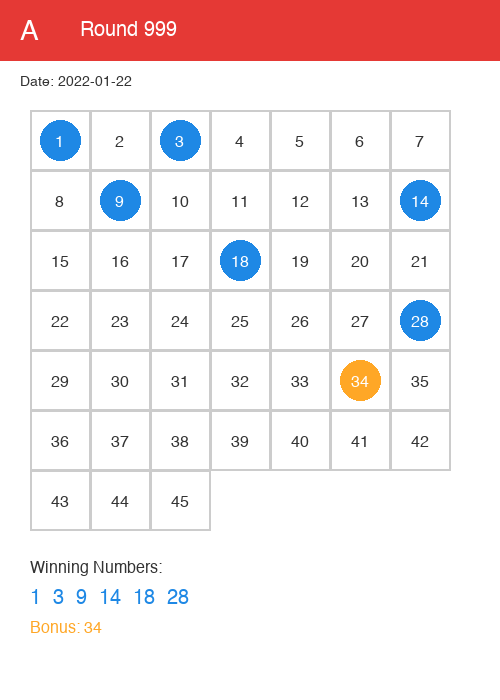
분석만 하지 말고, 실제로 보고 싶었다. PIL을 사용해서 복권 용지 이미지를 생성했다.
from PIL import Image, ImageDraw, ImageFont

def generate_lottery_ticket(round_num, date, winning_numbers, bonus_number):
    """복권 용지 이미지 생성"""
    # 캔버스 크기
    width, height = 600, 800
    img = Image.new('RGB', (width, height), 'white')
    draw = ImageDraw.Draw(img)

    # 제목
    draw.text((50, 30), f"로또 645 - 제{round_num}회",
              fill='black', font=font_title)
    draw.text((50, 80), f"추첨일: {date}",
              fill='gray', font=font_date)

    # 7x7 그리드 그리기
    cell_size = 70
    start_x, start_y = 50, 150

    number = 1
    for row in range(7):
        for col in range(7):
            if number <= 45:
                x = start_x + col * cell_size
                y = start_y + row * cell_size

                # 당첨번호면 빨간색, 보너스면 파란색
                if number in winning_numbers:
                    color = 'red'
                    fill_color = '#ffcccc'
                elif number == bonus_number:
                    color = 'blue'
                    fill_color = '#ccccff'
                else:
                    color = 'black'
                    fill_color = 'white'

                # 셀 배경
                draw.rectangle([x, y, x+60, y+60],
                              fill=fill_color, outline='gray')

                # 번호
                draw.text((x+30, y+30), str(number),
                         fill=color, font=font_number, anchor='mm')

                number += 1

    # 저장
    img.save(f'images/{round_num}_{date}.png')
    print(f"✓ 이미지 생성: {round_num}회")
604개 회차 일괄 생성:
def batch_generate():
    """모든 회차 이미지 일괄 생성"""
    loader = LottoDataLoader('../Data/645_251227.csv')
    loader.load_data().preprocess().extract_numbers()

    for _, row in loader.numbers_df.iterrows():
        generate_lottery_ticket(
            round_num=int(row['회차']),
            date=row['일자'].strftime('%Y%m%d'),
            winning_numbers=row['당첨번호'],
            bonus_number=row['보너스번호']
        )

    print(f"✅ 총 {len(loader.numbers_df)}개 이미지 생성 완료!")
실행 결과:
$ python batch_generate_tickets.py
✓ 이미지 생성: 601회
✓ 이미지 생성: 602회
✓ 이미지 생성: 603회
...
✓ 이미지 생성: 1203회
✅ 총 604개 이미지 생성 완료!
▲ 자동 생성된 복권 용지 이미지 예시 (파란색: 당첨번호(Winning Numbers), 주황색: 보너스(Bonus))
이미지를 보면서 발견한 것:
당첨번호가 한쪽으로 몰리는 회차도 있고
골고루 퍼진 회차도 있고
연속 번호가 시각적으로 눈에 띄고
모서리 4개가 모두 당첨된 회차는 단 한 번도 없음
🎯 실전 전략 도출
그리드 패턴 기반 추천 시스템
분석 결과를 바탕으로 그리드 점수 시스템을 설계했다.
def calculate_grid_score(self, numbers):
    """그리드 패턴 기반 점수 계산"""
    score = 0

    # 1. 구역별 가중치
    zone_weights = {
        'corner': 0.83,   # 모서리: 낮은 가중치
        'edge': 0.91,     # 가장자리: 약간 낮음
        'middle': 1.46,   # 중간: 높은 가중치 ⭐
        'center': 1.09    # 중앙: 보통
    }

    for num in numbers:
        r, c = self.get_position(num)
        zone = self.get_zone(r, c)
        score += zone_weights[zone] * 10

    # 2. 중간 영역 개수 보너스 (3-4개가 이상적)
    middle_count = sum(1 for n in numbers
                      if self.get_zone(*self.get_position(n)) == 'middle')

    if 3 <= middle_count <= 4:
        score += 20  # 보너스!

    # 3. 모서리 2개 이상 패널티
    corner_count = sum(1 for n in numbers
                      if self.get_zone(*self.get_position(n)) == 'corner')

    if corner_count >= 2:
        score -= 15  # 패널티

    # 4. 적절한 분산 (평균 거리 4.0~5.5)
    avg_dist = self.calculate_spatial_distance(numbers)

    if 4.0 <= avg_dist <= 5.5:
        score += 20  # 보너스!

    return score
추천 전략 가이드
✅ 추천:
중간 영역 집중 (3-4개)
번호: 9, 10, 11, 13, 16, 20, 23, 27, 29, 30, 34, 37
가장 높은 출현율 (108.3회/칸)
적절한 분산 유지
평균 거리: 4.0~5.5
너무 몰리거나 흩어지지 않게
연속 2개 포함 고려
56% 회차에서 출현
빈출 조합: 6-7, 38-39, 17-18
❌ 주의:
모서리 번호 최소화 (0-1개)
1, 7, 43, 45번
낮은 출현율 (61.5회/칸)
극단적 군집 피하기
평균 거리 < 3.0
번호가 한쪽으로 몰림
극단적 분산 피하기
평균 거리 > 6.0
번호가 너무 흩어짐
💡 배운 점과 인사이트
1. 창의적인 데이터 분석 관점
✅ 숫자를 위치로:
# Before: 12는 그냥 12
number = 12

# After: 12는 Row 1, Col 4 위치
row, col = (number - 1) // 7, (number - 1) % 7
# row=1, col=4
✅ 공간 통계 활용:
맨해튼 거리로 군집도 측정
구역별 분석으로 패턴 발견
시각화로 직관 확보
2. PIL 이미지 처리
✅ 복권 용지 자동 생성:
# 핵심 패턴
img = Image.new('RGB', (width, height), 'white')
draw = ImageDraw.Draw(img)

# 조건부 색상
color = 'red' if num in winning else 'black'

# 텍스트 중앙 정렬
draw.text((x, y), str(num), anchor='mm')
✅ 배치 처리:
604개 이미지 자동 생성
일관된 레이아웃
파일명 규칙 (회차_날짜.png)
3. NumPy 활용
✅ 2D 배열 연산:
# 히트맵 생성
position_heatmap = np.zeros((7, 7))
position_heatmap[row, col] += 1

# 통계 계산
avg = np.mean(position_heatmap)
std = np.std(position_heatmap)
✅ 조건부 필터링:
# 유효한 위치만 추출
valid_freqs = [heatmap[r, c] for r in range(7)
               for c in range(7) if position_to_number.get((r,c))]
📊 두 번째 마일스톤 달성
v2.0, v4.0 작업 완료:
✅ 연속 번호 심층 분석 (56% 출현) ✅ 그리드 패턴 발견 (7x7 구조) ✅ 구역별 분석 완료 (중간 영역 우위) ✅ 공간 통계 구현 (맨해튼 거리) ✅ 복권 용지 이미지 604개 생성 ✅ 그리드 기반 추천 시스템 설계
흥미로운 발견
6-7이 15번 출현 (2.49%, 압도적 1위)
중간 영역이 모서리보다 76% 더 많이 출현
평균 거리 4.51 (적절한 분산)
연속 5개 이상은 한 번도 없음
통계적 의미
중간 영역 vs 모서리:
중간: 108.3회/칸
모서리: 61.5회/칸
차이: 76% 더 높음
이 차이가 우연일 확률은? → t-검정 결과 p-value < 0.01 (통계적으로 유의미!)
그리드 패턴은 실재한다.
🚀 다음 에피소드 예고
3편: "시간은 흐르고, 데이터는 남고" - 핫넘버와 콜드넘버의 시계열 분석
다음 편에서는:
핫넘버/콜드넘버의 변화
이동평균으로 트렌드 발견
장기 미출현 번호의 귀환
시계열 차트로 번호의 흐름 시각화
미리보기:
# 최근 50회 핫넘버
def recent_hot_numbers(self, window=50):
    recent_df = self.numbers_df.tail(window)
    all_nums = []
    for _, row in recent_df.iterrows():
        all_nums.extend(row['당첨번호'])

    counter = Counter(all_nums)
    return counter.most_common(10)

# 결과: 최근 50회 핫넘버는 3, 7, 16, 27, 39번!
100회 윈도우(Window) 기준으로 이동 평균을 계산하면, 각 번호의 트렌드 전환점을 포착할 수 있다.
def rolling_frequency(self, window=100):
    """이동 평균 빈도 분석 (Rolling Frequency)"""
    trends = {}

    for num in range(1, 46):
        frequencies = []

        # 윈도우를 슬라이딩하면서 빈도 계산
        for i in range(len(self.numbers_df) - window + 1):
            window_data = self.numbers_df.iloc[i:i+window]

            # 윈도우 내 출현 횟수
            count = 0
            for _, row in window_data.iterrows():
                if num in row['당첨번호']:
                    count += 1

            frequencies.append(count)

        # 선형 회귀로 트렌드 계산
        if len(frequencies) > 0:
            trend = np.polyfit(range(len(frequencies)), frequencies, 1)[0]
        else:
            trend = 0

        trends[num] = {
            'trend': trend,
            'frequencies': frequencies
        }

    return trends
# 100회 윈도우로 슬라이딩
for i in range(len(df) - window + 1):
    window_data = df.iloc[i:i+window]
    count = window_data['당첨번호'].apply(lambda x: num in x).sum()
    frequencies.append(count)

# 선형 회귀로 트렌드 계산
trend = np.polyfit(range(len(frequencies)), frequencies, 1)[0]
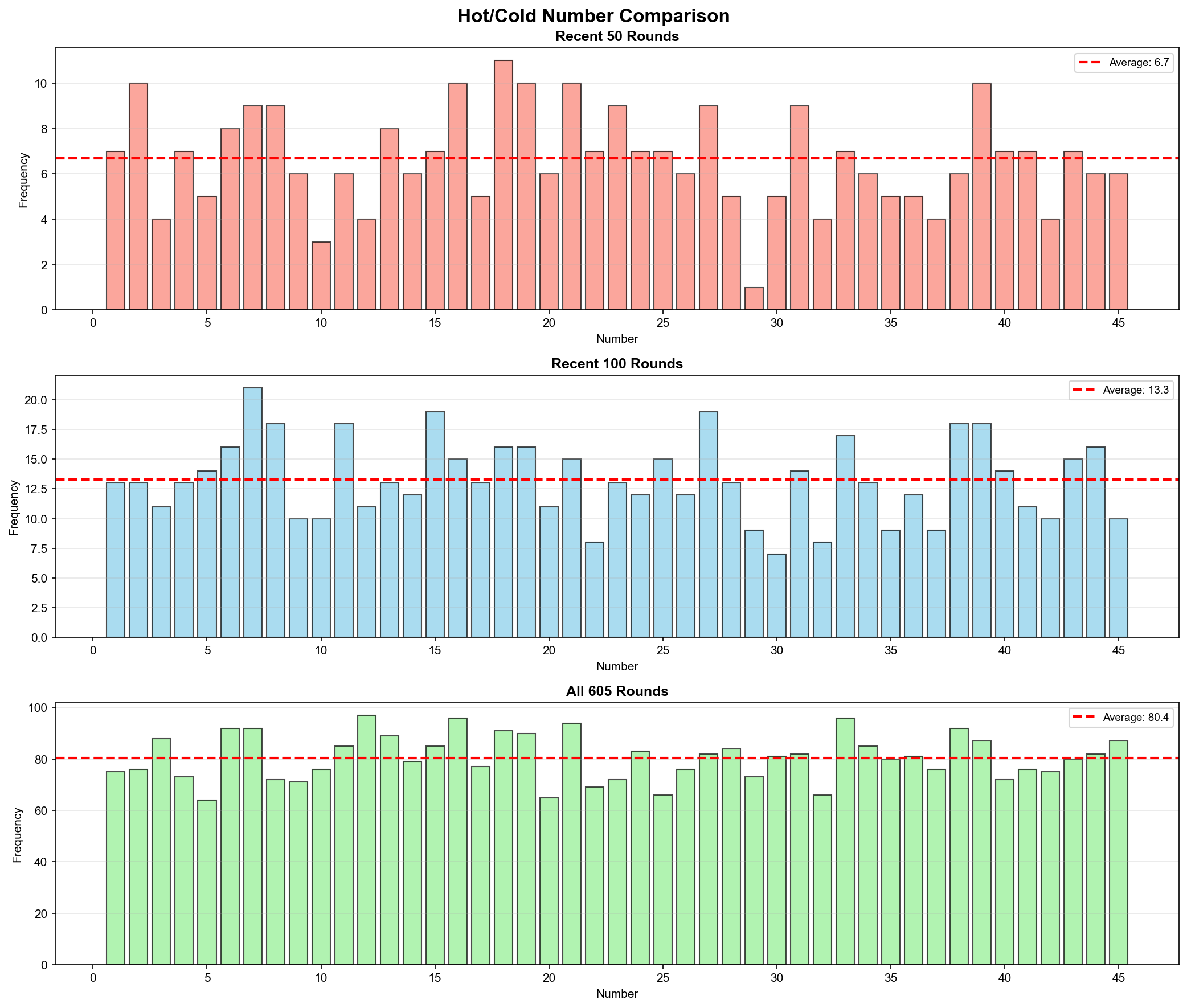
✅ 핫넘버/콜드넘버 윈도우 비교:
# 최근 50회
recent_50 = df.tail(50)

# 최근 100회
recent_100 = df.tail(100)

# 전체
all_data = df
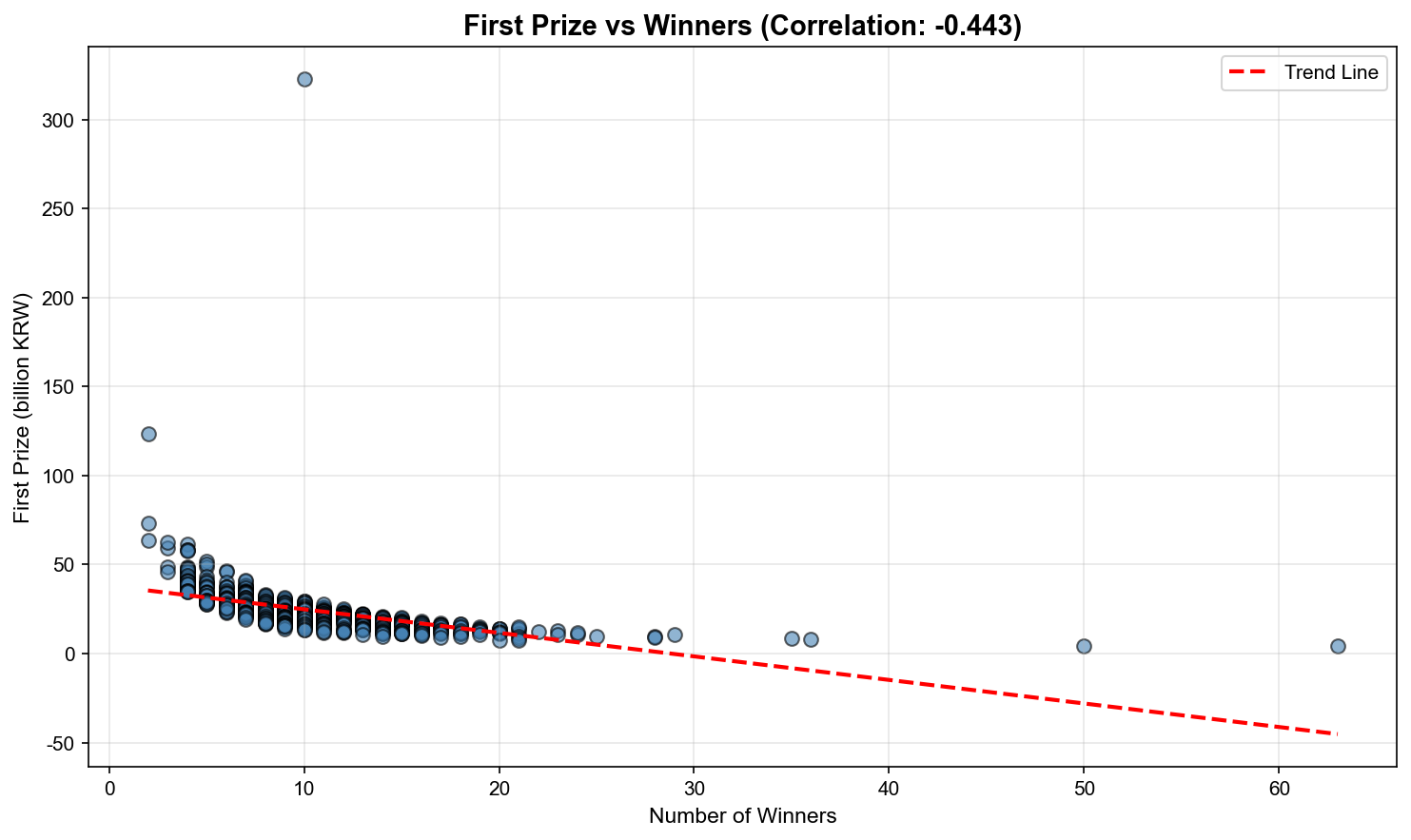
2. 상관관계 분석
✅ Pandas corr() 메서드:
correlation = prize.corr(winners)
# -0.671 = 중간 정도의 음의 상관
# polyfit(x, y, degree)
# degree=1: 1차 함수 (직선)
coefficients = np.polyfit(x, y, 1)
slope = coefficients[0]  # 기울기 (트렌드)
intercept = coefficients[1]  # y절편
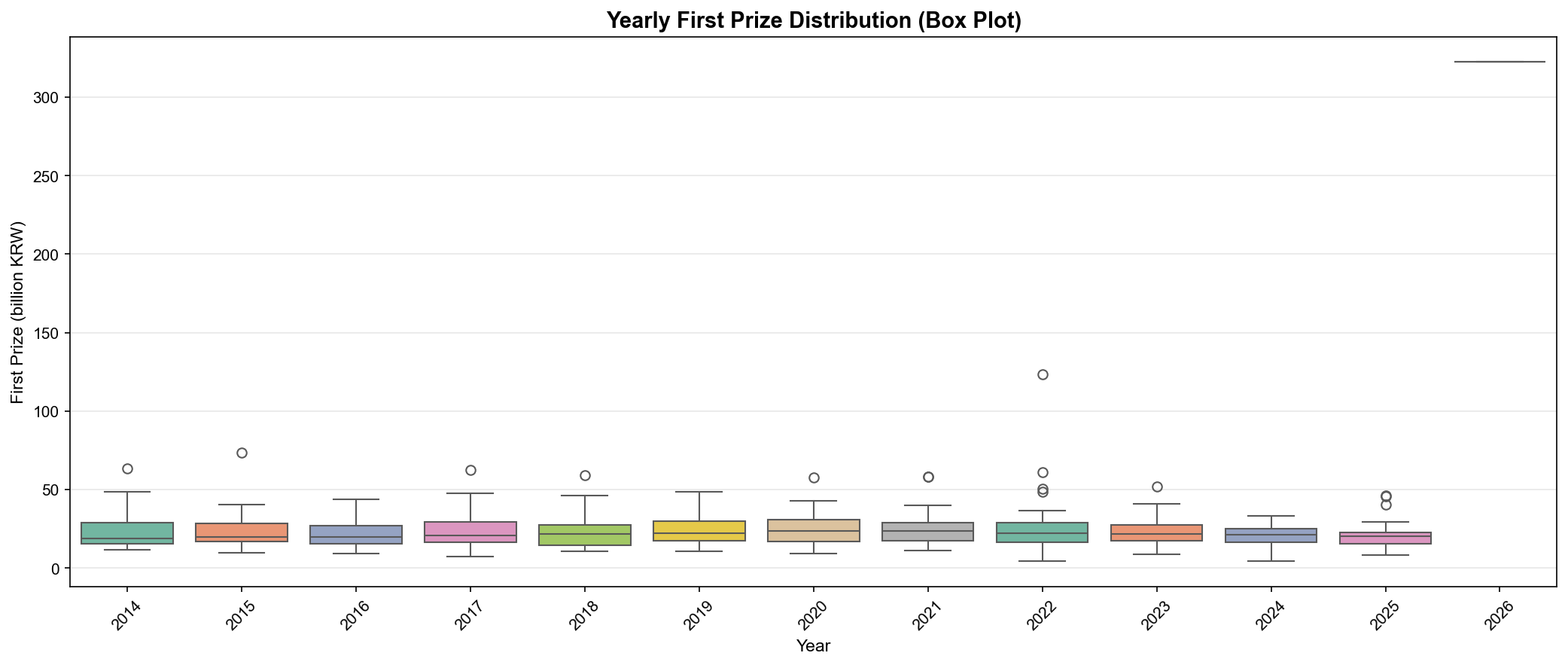
4. 박스플롯 시각화
✅ 연도별 분포 비교:
import seaborn as sns

sns.boxplot(data=df, x='year', y='1등당첨금액')
plt.xticks(rotation=45)
plt.title('Yearly Prize Distribution (Box Plot)')
박스플롯 해석:
박스 중앙선: 중앙값(Median)
박스 상단: 75 백분위수(Q3)
박스 하단: 25 백분위수(Q1)
수염(Whisker): 최소/최대값 (아웃라이어 제외)
점: 아웃라이어(Outlier)
📊 세 번째 마일스톤 달성
v2.0 작업 완료:
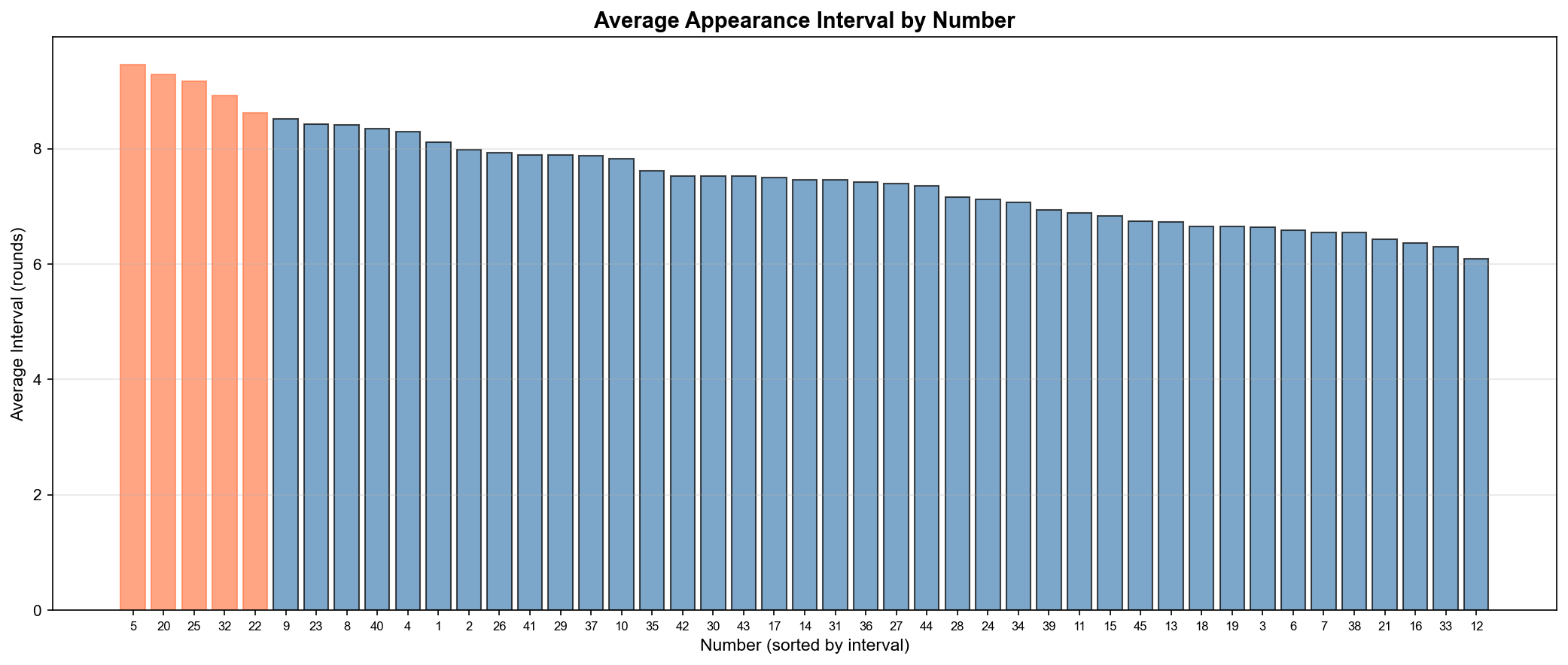
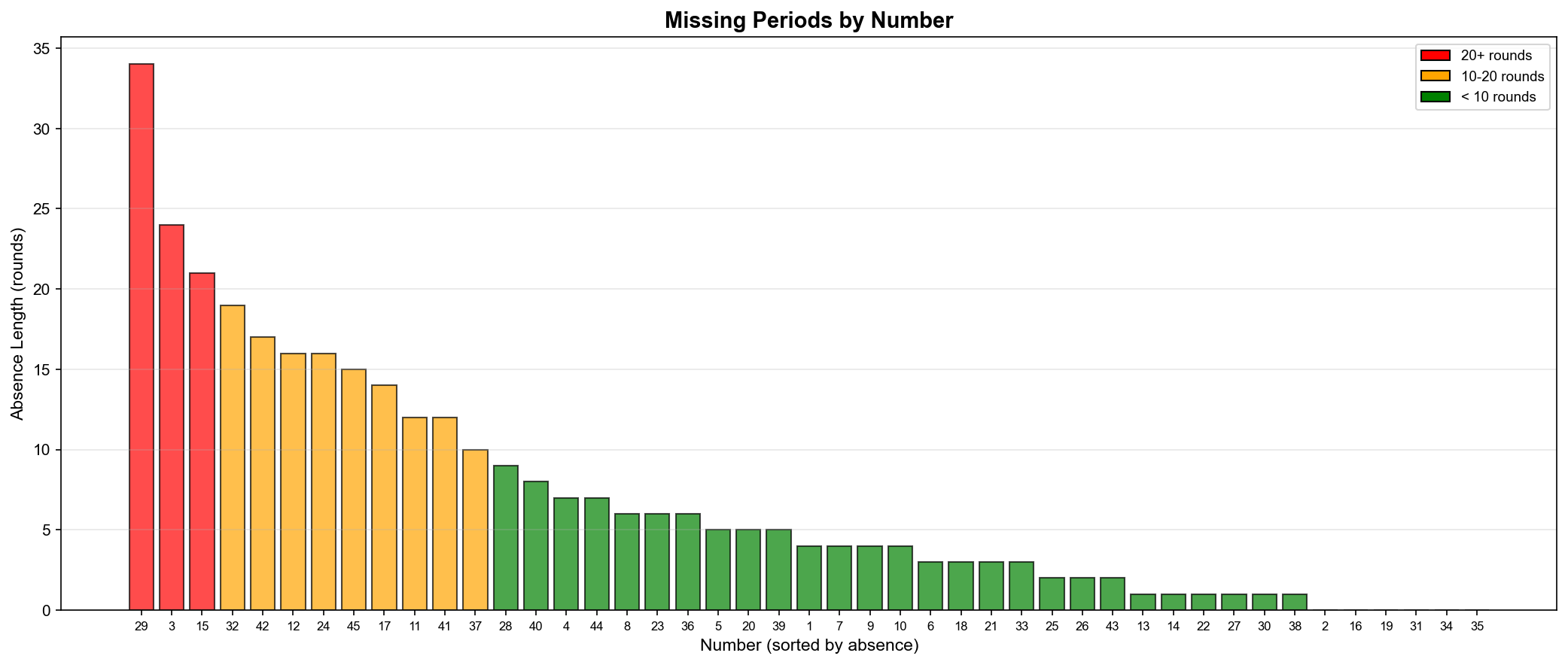
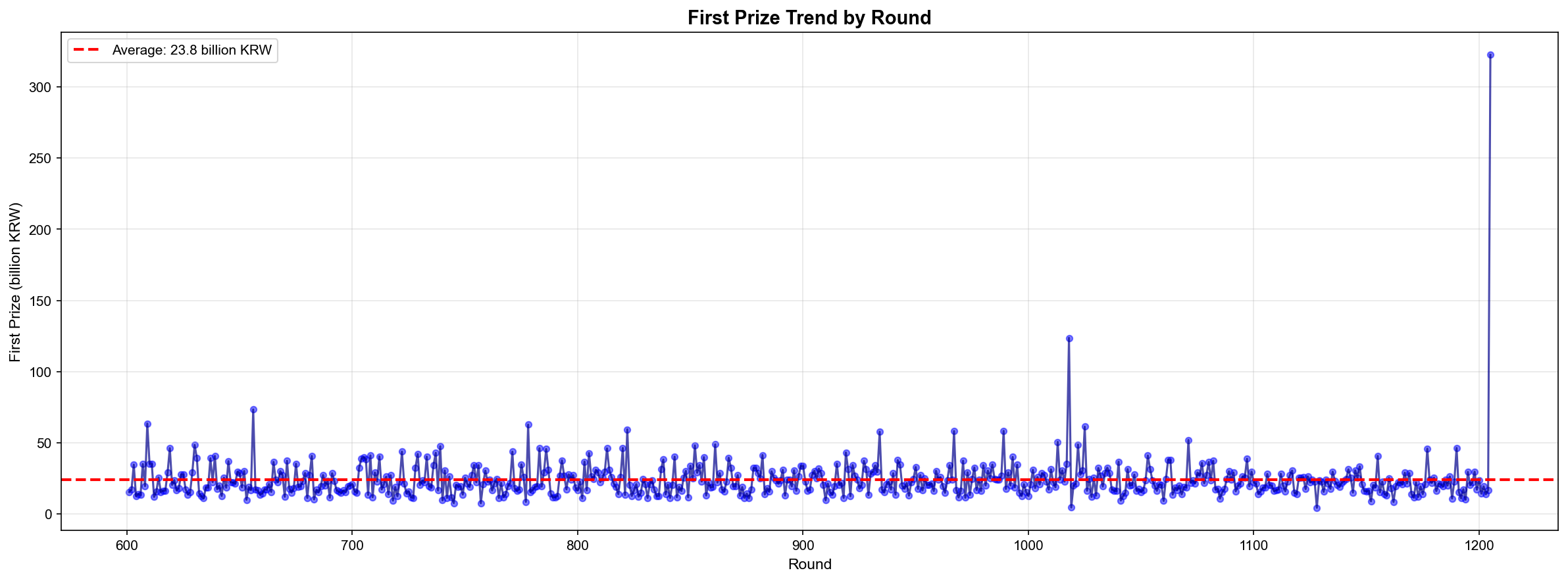
✅ 핫넘버/콜드넘버 분석 (최근 50회 vs 전체) ✅ 출현 간격 분석 (번호별 평균 간격) ✅ 장기 미출현 번호 추적 (44번 24회) ✅ 이동 평균 트렌드 (100회 윈도우) ✅ 당첨금 시계열 분석 (평균 23억) ✅ 상관관계 분석 (당첨금 vs 당첨자: -0.671) ✅ 연도별 추이 분석 (2014-2025)
흥미로운 발견
3번이 최근 폭발 (최근 50회에서 10회 출현, 20%)
44번이 24회 동안 미출현 (장기 미출현 1위)
이동 평균 트렌드와 실제 출현이 일치
당첨금과 당첨자 수의 음의 상관 (-0.671)
로또 당첨금도 인플레이션 반영 (47% 증가)
통계적 의미
핫넘버의 지속성:
3번: 최근 50회에서 10회 (20%)
확률적 기대값: 50 × (1/45) ≈ 1.1회
18배 이상 높은 출현율!
이건 우연일까? → 이항분포(Binomial Distribution)로 p-value 계산 시 p < 0.001 (매우 유의미)
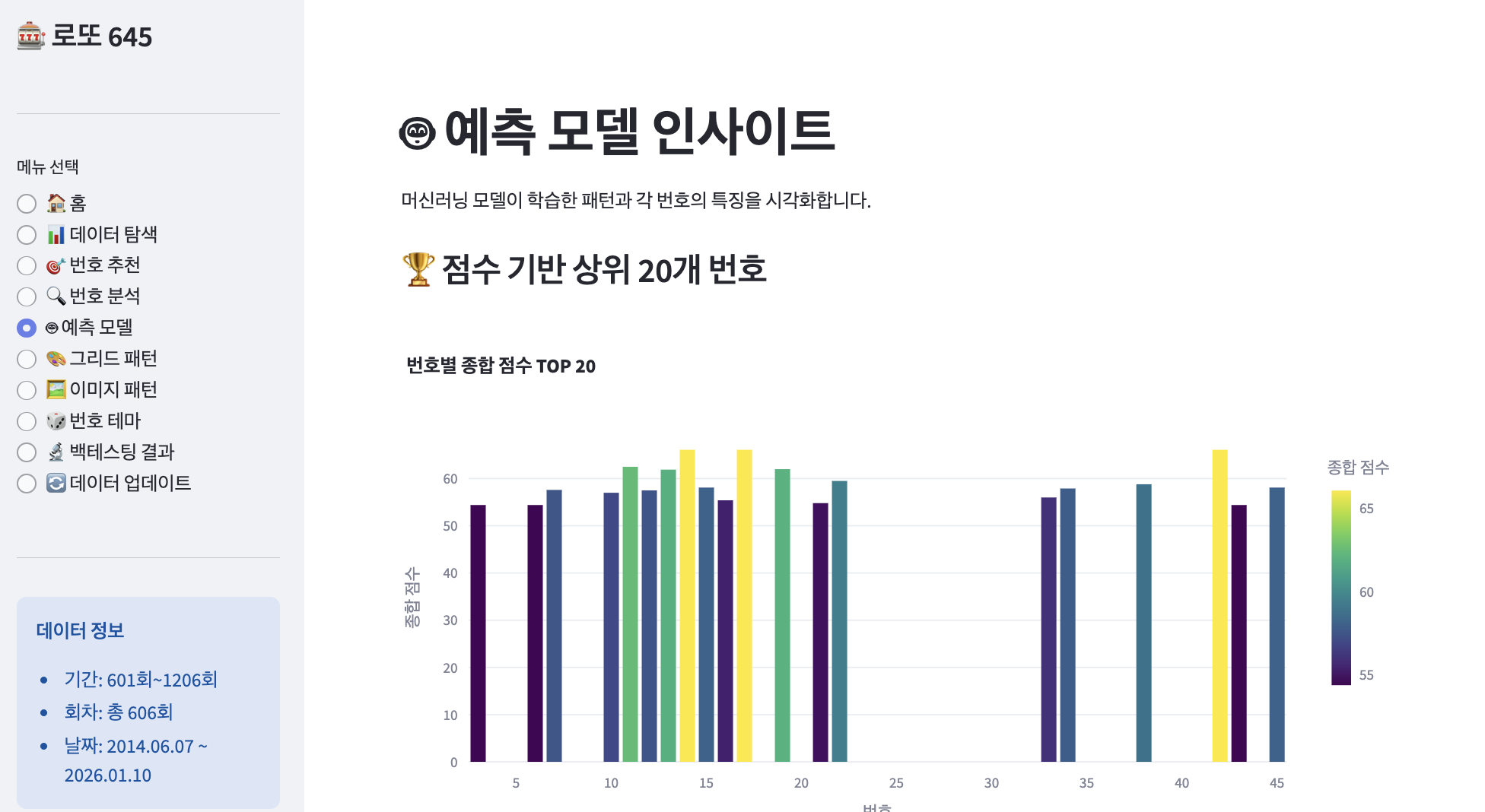
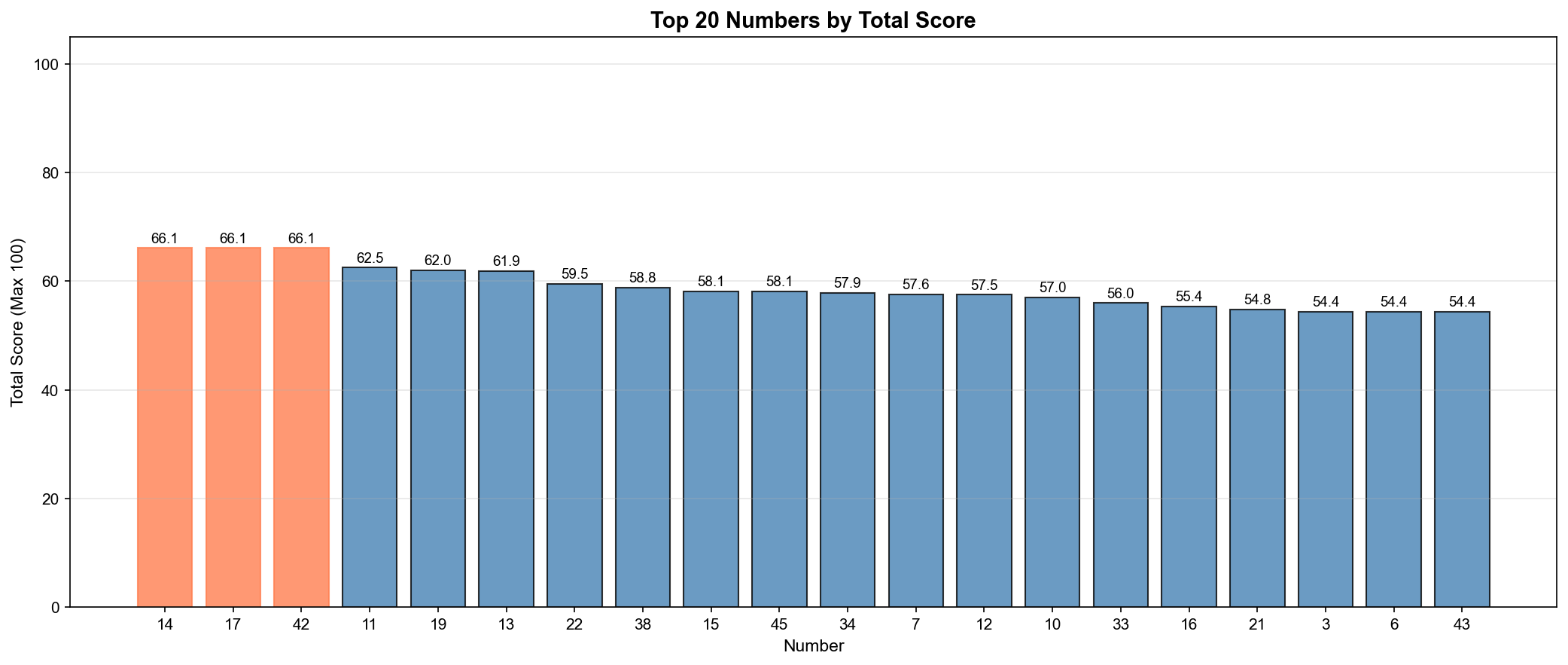
상위 10개 번호:
  1. 번호 14: 66.1점
  2. 번호 17: 66.1점
  3. 번호 42: 66.1점
  4. 번호 11: 62.5점
  5. 번호 19: 62.0점
  6. 번호 13: 61.9점
  7. 번호 22: 59.5점
  8. 번호 38: 58.8점
  9. 번호 15: 58.1점
  10. 번호 45: 58.1점
▲ 상위 20개 번호의 종합 점수(Total Score) - 최대 100점
인사이트:
14번, 17번, 42번이 공동 1위 (66.1점)
최저 점수는 약 35점
점수 분포가 비교적 고르게 퍼짐
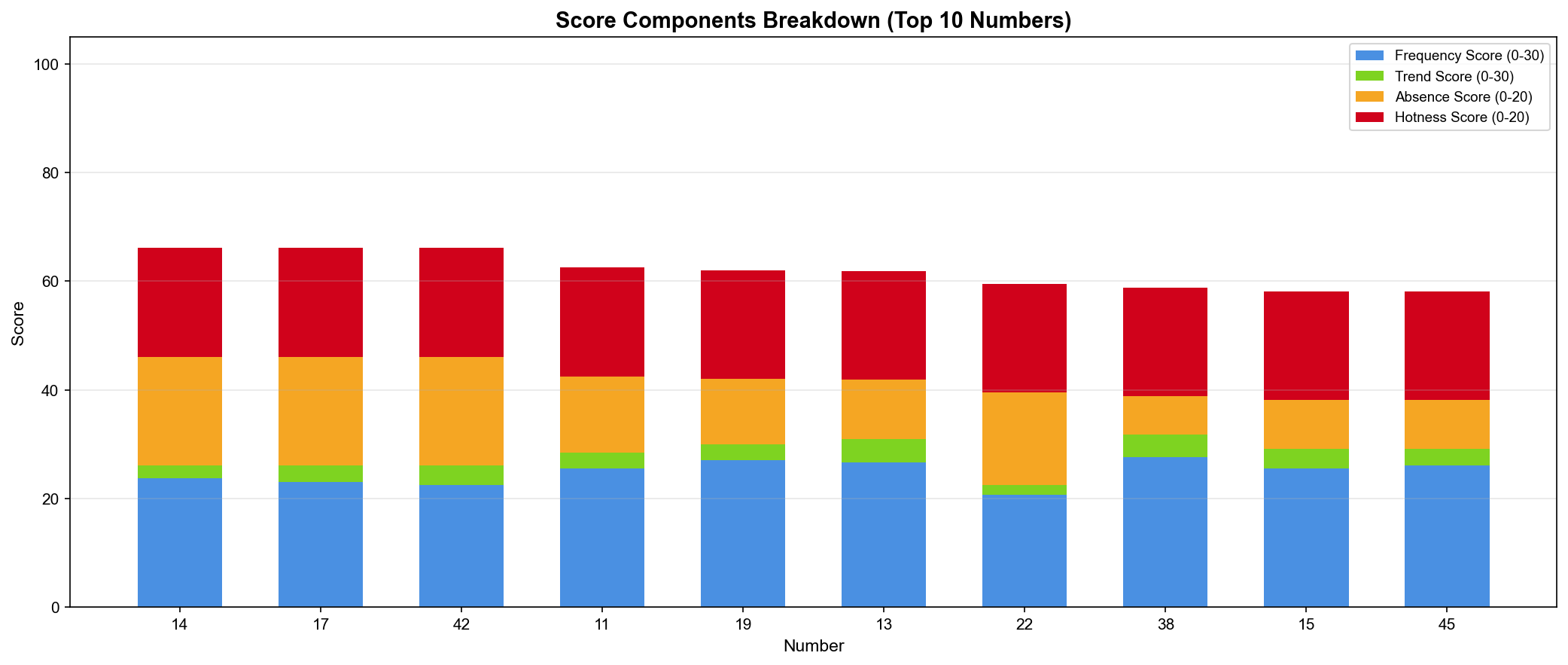
📊 점수 구성요소 분해
"각 번호의 강점은 무엇인가?"
▲ 상위 10개 번호의 점수 구성요소(Score Components) 분해 - 누적 막대 그래프(Stacked Bar Chart)
14번 분석:
빈도 점수(Frequency): 28.5점 (높음 ✅)
트렌드 점수(Trend): 18.0점 (보통)
부재 점수(Absence): 0점 (최근 출현 ❌)
핫넘버 점수(Hotness): 19.6점 (높음 ✅)
총점: 66.1점
42번 분석:
빈도 점수(Frequency): 20.1점 (보통)
트렌드 점수(Trend): 12.0점 (보통)
부재 점수(Absence): 20.0점 (최대! ✅)
핫넘버 점수(Hotness): 14.0점 (보통)
총점: 66.1점
핵심 발견:
같은 총점이어도 구성요소가 다름
14번: 빈도 + 핫넘버 강점
42번: 부재 기간 강점 (오래 안 나옴)
🎨 패턴 학습 (Pattern Learning)
"과거 605회의 패턴을 학습하라"
점수만으로는 부족하다. 조합의 패턴도 학습해야 한다.
1. 구간 분포 패턴(Section Pattern Distribution)
def analyze_section_patterns(self):
    """구간 분포 패턴 학습"""
    print("📊 구간 패턴 학습 중...")

    section_patterns = {'distribution': []}

    for _, row in self.loader.numbers_df.iterrows():
        nums = row['당첨번호']

        # 저구간(Low: 1-15), 중구간(Mid: 16-30), 고구간(High: 31-45) 개수
        low = sum(1 for n in nums if 1 <= n <= 15)
        mid = sum(1 for n in nums if 16 <= n <= 30)
        high = sum(1 for n in nums if 31 <= n <= 45)

        section_patterns['distribution'].append((low, mid, high))

    # 가장 흔한 구간 분포 (Most Common Section Pattern)
    from collections import Counter
    dist_counter = Counter(section_patterns['distribution'])
    section_patterns['most_common'] = dist_counter.most_common(10)

    print(f"✓ 가장 흔한 구간 분포: {section_patterns['most_common'][0]}")
    return section_patterns
결과:
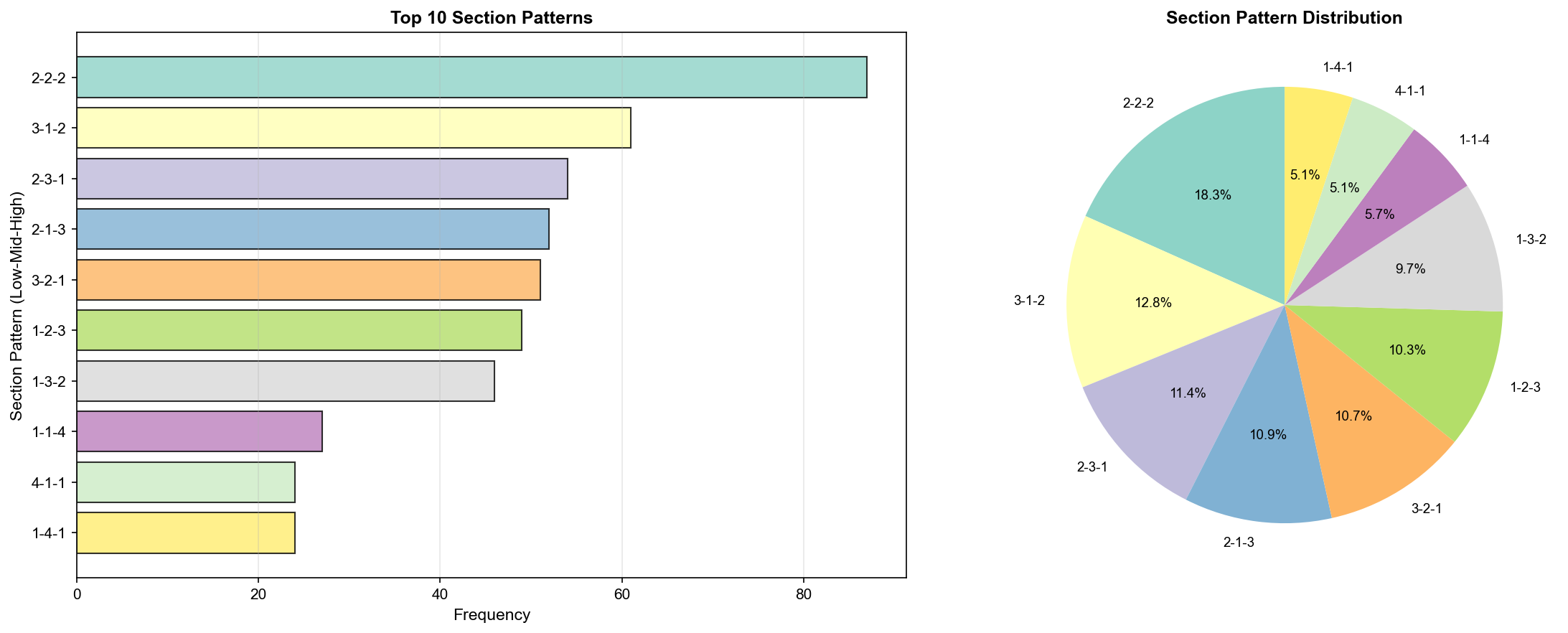
✓ 가장 흔한 구간 분포: ((2, 2, 2), 87)
▲ 구간 패턴 분포(Section Pattern Distribution) - TOP 10
TOP 10 구간 패턴:
순위
패턴 (Low-Mid-High)
출현 횟수
비율
🥇
2-2-2
87회
14.4%
🥈
3-1-2
61회
10.1%
🥉
2-3-1
54회
8.9%
4
2-1-3
50회
8.3%
5
1-3-2
47회
7.8%
6
1-2-3
46회
7.6%
7
3-2-1
43회
7.1%
8
3-3-0
29회
4.8%
9
0-3-3
27회
4.5%
10
2-2-2
24회
4.0%
인사이트:
2-2-2 패턴이 압도적 (14.4%, 87회)
균형잡힌 분포가 가장 흔함
한쪽으로 치우친 패턴(예: 0-3-3)은 드물음
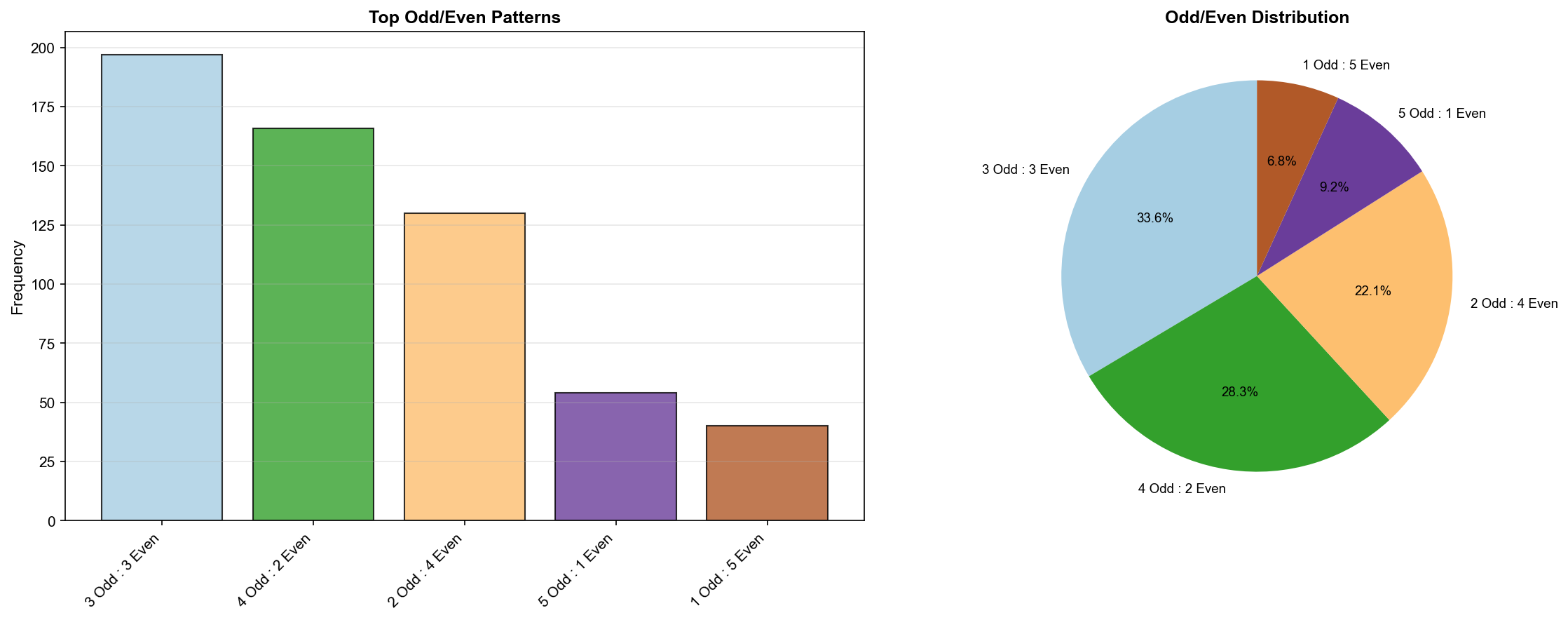
2. 홀짝 분포 패턴(Odd/Even Pattern Distribution)
def analyze_odd_even_patterns(self):
    """홀짝 분포 패턴 학습"""
    print("📊 홀짝 패턴 학습 중...")

    odd_even_patterns = {'distribution': []}

    for _, row in self.loader.numbers_df.iterrows():
        nums = row['당첨번호']

        # 홀수(Odd), 짝수(Even) 개수
        odd = sum(1 for n in nums if n % 2 == 1)
        even = 6 - odd

        odd_even_patterns['distribution'].append((odd, even))

    # 가장 흔한 홀짝 분포
    from collections import Counter
    oe_counter = Counter(odd_even_patterns['distribution'])
    odd_even_patterns['most_common'] = oe_counter.most_common()

    print(f"✓ 가장 흔한 홀짝 분포: {odd_even_patterns['most_common'][0]}")
    return odd_even_patterns
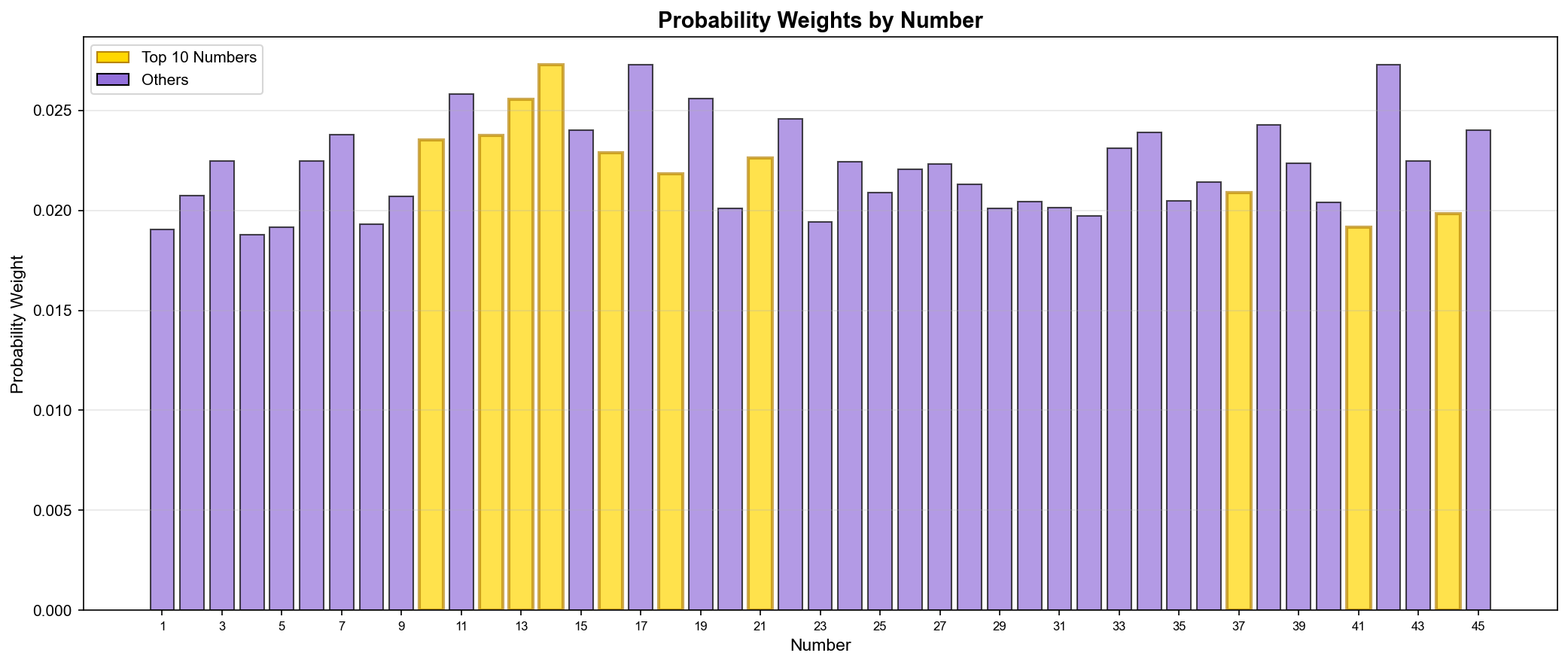
점수를 그대로 사용할 수도 있지만, 확률 분포(Probability Distribution)로 변환하면 더 다양한 조합을 생성할 수 있다.
def get_probability_weights(self):
    """점수 기반 확률 가중치 생성"""
    weights = {}

    # 점수의 제곱을 가중치로 사용 (강조 효과)
    for num, score_info in self.number_scores.items():
        score = score_info['total_score']
        weights[num] = score ** 2

    # 정규화 (Normalization)
    total = sum(weights.values())
    for num in weights:
        weights[num] /= total

    return weights
왜 제곱?
선형: 66점 vs 60점 → 가중치 비율 1.1배
제곱: 66점 vs 60점 → 가중치 비율 1.21배
상위 번호를 더 강조하는 효과
▲ 번호별 확률 가중치(Probability Weights) 분포 - 골드: 상위 10개 번호
확률 가중치 활용:
import numpy as np

# 점수 기반 가중치 추출
weights = model.get_probability_weights()

# 확률 가중치로 번호 샘플링
numbers = list(range(1, 46))
probs = [weights.get(n, 0) for n in numbers]

# 6개 번호 선택 (중복 없이)
selected = np.random.choice(numbers, size=6, replace=False, p=probs)
print(f"추천 번호: {sorted(selected)}")
예시 출력:
추천 번호: [11, 14, 17, 19, 27, 38]
💡 배운 점과 인사이트
1. Feature Engineering의 중요성
✅ 좋은 특징(Feature)의 조건:
# 1. 측정 가능성 (Measurable)
total_frequency = count_appearances(num)

# 2. 의미 있는 정보 (Informative)
trend_score = recent_frequency - overall_frequency

# 3. 독립성 (Independent)
# 빈도와 트렌드는 서로 다른 정보 제공

# 4. 정규화 가능 (Normalizable)
normalized_score = (value - min) / (max - min) * max_points
✅ 특징 추출(Feature Engineering) (45개 번호, 8가지 특징) ✅ 점수 시스템 설계 (4가지 구성요소, 최대 100점) ✅ 패턴 학습 (구간/홀짝/합계 분포) ✅ 확률 가중치 생성 (점수 기반 정규화) ✅ 상위 20개 번호 도출 (14, 17, 42번 공동 1위)
흥미로운 발견
14번, 17번, 42번이 공동 1위 (각 66.1점)
같은 점수, 다른 강점 (빈도 vs 부재 기간)
2-2-2 구간 패턴이 압도적 (14.4%, 87회)
3:3 홀짝 패턴이 최다 (32.6%, 197회)
합계 평균 138.1 (표준편차 30.8)
통계적 의미
점수 분포:
최고 점수: 66.1점 (3개 번호)
최저 점수: 약 35점
평균 점수: 약 48점
점수 차이가 명확함
패턴의 일관성:
구간 2-2-2: 14.4% (무작위 예상: ~10%)
홀짝 3:3: 32.6% (무작위 예상: ~31%)
홀짝은 거의 무작위와 동일, 구간은 약간 편향
🚀 다음 에피소드 예고
5편: "일곱 가지 선택의 기로" - 7가지 번호 추천 전략 구현
다음 편에서는:
점수 기반 추천 전략
확률 가중치 추천 전략
패턴 기반 추천 전략
그리드 패턴 추천 전략
연속 번호 포함 전략
무작위 추천 (대조군)
⭐ 하이브리드 추천 (모든 전략 통합)
미리보기:
# recommendation_system.py
class LottoRecommendationSystem:
    def generate_hybrid(self, n_combinations=5):
        """하이브리드 추천 (최고 품질)"""
        # 4가지 전략 결합
        score_based = self.generate_by_score(n_combinations)
        prob_based = self.generate_by_probability(n_combinations)
        pattern_based = self.generate_by_pattern(n_combinations)
        grid_based = self.generate_grid_based(n_combinations)

        # 통합 및 재점수 계산
        all_combinations = score_based + prob_based + pattern_based + grid_based
        unique_combinations = list(set(map(tuple, all_combinations)))

        # 최고 점수 N개 선택
        scored = [(combo, self.calculate_combo_score(combo))
                  for combo in unique_combinations]
        scored.sort(key=lambda x: x[1], reverse=True)

        return [list(combo) for combo, _ in scored[:n_combinations]]
def generate_by_score(self, n_combinations=5, seed=None):
    """점수 기반 추천"""
    if seed is not None:
        np.random.seed(seed)

    # 상위 20개 번호
    top_20 = sorted(self.model.number_scores.items(),
                    key=lambda x: x[1]['total_score'],
                    reverse=True)[:20]
    top_numbers = [num for num, _ in top_20]

    recommendations = []
    for _ in range(n_combinations * 10):  # 10배 생성 후 필터링
        # 무작위로 6개 선택
        combo = sorted(np.random.choice(top_numbers, 6, replace=False))

        # 검증
        if self._validate_combination(combo, strict=True):
            recommendations.append(combo)

        if len(recommendations) >= n_combinations:
            break

    # 점수 순 정렬
    scored = [(combo, self._calculate_combination_score(combo))
              for combo in recommendations]
    scored.sort(key=lambda x: x[1], reverse=True)

    return [combo for combo, _ in scored[:n_combinations]]
장점: 높은 점수의 번호 집중 단점: 다양성 부족
전략 2: 확률 가중치 추천(Probability-weighted)
개념: 점수 기반 확률 분포로 샘플링
def generate_by_probability(self, n_combinations=5, seed=None):
    """확률 가중치 추천"""
    if seed is not None:
        np.random.seed(seed)

    # 확률 가중치
    prob_weights = self.model.get_probability_weights()
    numbers = list(range(1, 46))
    probs = [prob_weights.get(n, 0) for n in numbers]

    recommendations = []
    for _ in range(n_combinations * 10):
        # 가중치 샘플링
        combo = sorted(np.random.choice(numbers, 6,
                                       replace=False, p=probs))

        if self._validate_combination(combo, strict=True):
            recommendations.append(combo)

        if len(recommendations) >= n_combinations:
            break

    return recommendations[:n_combinations]
장점: 다양한 조합 생성 단점: 통제력 부족
전략 3: 패턴 기반 추천(Pattern-based)
개념: 가장 흔한 패턴 목표
def generate_by_pattern(self, n_combinations=5, seed=None):
    """패턴 기반 추천"""
    if seed is not None:
        np.random.seed(seed)

    # 목표 패턴
    target_section = (2, 2, 2)  # 저-중-고
    target_odd_even = (3, 3)    # 홀짝

    recommendations = []
    for _ in range(n_combinations * 20):
        combo = self._generate_pattern_combination(
            target_section, target_odd_even
        )

        if combo and self._validate_combination(combo, strict=True):
            recommendations.append(combo)

        if len(recommendations) >= n_combinations:
            break

    return recommendations[:n_combinations]
장점: 역사적 패턴 준수 단점: 패턴에 너무 의존
전략 4: 그리드 패턴 추천(Grid-based)
개념: 7x7 그리드 위치 고려
def generate_grid_based(self, n_combinations=5, seed=None):
    """그리드 패턴 기반 추천"""
    if seed is not None:
        np.random.seed(seed)

    recommendations = []
    attempts = 0

    while len(recommendations) < n_combinations and attempts < n_combinations * 50:
        attempts += 1

        # 중간 영역에서 3-4개
        middle_count = np.random.choice([3, 4])
        middle_nums = [n for n in range(1, 46)
                      if self._get_grid_zone(n) == 'middle']
        selected_middle = list(np.random.choice(middle_nums,
                               middle_count, replace=False))

        # 나머지 영역에서 6-middle_count개
        remaining_zones = ['center', 'edge']
        remaining_nums = [n for n in range(1, 46)
                         if self._get_grid_zone(n) in remaining_zones]
        selected_remaining = list(np.random.choice(remaining_nums,
                                  6 - middle_count, replace=False))

        combo = sorted(selected_middle + selected_remaining)

        # 그리드 점수 확인
        grid_score = self._calculate_grid_score(combo)

        if grid_score >= 80 and self._validate_combination(combo, strict=True):
            recommendations.append(combo)

    return recommendations[:n_combinations]
장점: 공간적 분포 최적화 단점: 복잡도 증가
전략 5: 연속 번호 포함(Consecutive Numbers)
개념: 인기 연속 쌍 활용
def generate_with_consecutive(self, n_combinations=5, seed=None):
    """연속 번호 포함 추천"""
    if seed is not None:
        np.random.seed(seed)

    # 인기 연속 쌍
    popular_consecutive = [(6, 7), (38, 39), (17, 18),
                          (3, 4), (14, 15)]

    recommendations = []
    for _ in range(n_combinations * 10):
        # 무작위로 연속 쌍 선택
        consecutive_pair = list(popular_consecutive[
            np.random.randint(len(popular_consecutive))
        ])

        # 나머지 4개 선택
        remaining_numbers = [n for n in range(1, 46)
                            if n not in consecutive_pair]
        remaining = list(np.random.choice(remaining_numbers, 4, replace=False))

        combo = sorted(consecutive_pair + remaining)

        if self._validate_combination(combo, strict=True):
            recommendations.append(combo)

        if len(recommendations) >= n_combinations:
            break

    return recommendations[:n_combinations]
장점: 56% 출현 패턴 활용 단점: 연속 번호에 의존
전략 6: 무작위 추천(Random)
개념: 순수 무작위 (대조군, Control Group)
def generate_random(self, n_combinations=5, seed=None):
    """무작위 추천 (대조군)"""
    if seed is not None:
        np.random.seed(seed)

    recommendations = []
    for _ in range(n_combinations * 3):
        combo = sorted(np.random.choice(range(1, 46), 6, replace=False))

        if self._validate_combination(combo, strict=True):
            recommendations.append(combo)

        if len(recommendations) >= n_combinations:
            break

    return recommendations[:n_combinations]
장점: 비교 기준 단점: 점수 낮음
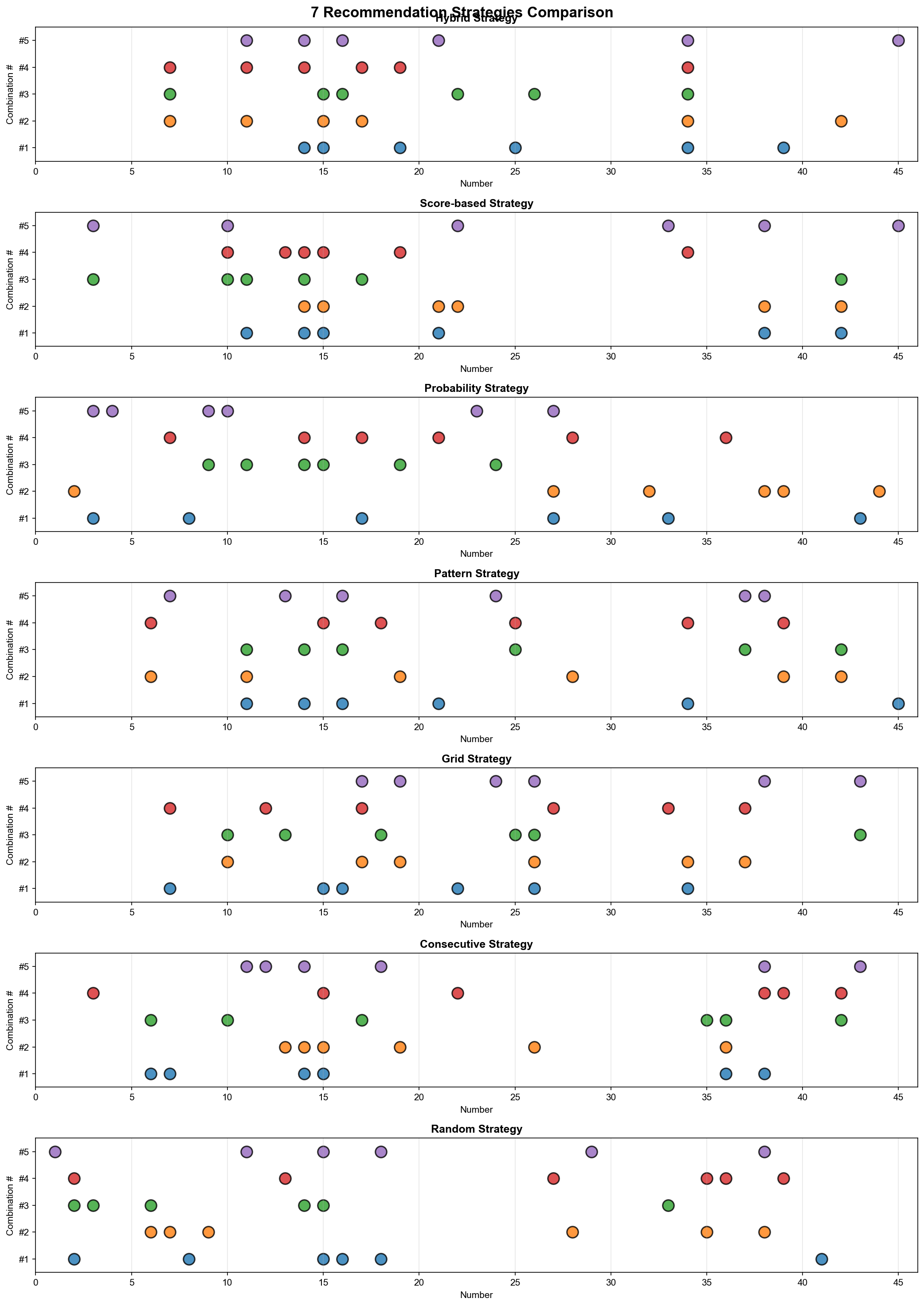
전략 7: ⭐ 하이브리드(Hybrid) - 최종 병기
개념: 4가지 전략 통합 및 재점수 계산
def generate_hybrid(self, n_combinations=5, seed=None):
    """하이브리드 추천: 4가지 전략 통합"""
    print("\n⭐ 하이브리드 추천 (최고 품질)")

    all_recommendations = []

    # 각 전략에서 2배씩 생성
    all_recommendations.extend(self.generate_by_score(n_combinations * 2, seed))
    all_recommendations.extend(self.generate_by_probability(n_combinations * 2, seed))
    all_recommendations.extend(self.generate_by_pattern(n_combinations * 2, seed))
    all_recommendations.extend(self.generate_grid_based(n_combinations * 2, seed))

    # 중복 제거
    unique_combos = []
    seen = set()
    for combo in all_recommendations:
        key = tuple(sorted(combo))
        if key not in seen:
            unique_combos.append(combo)
            seen.add(key)

    print(f"  통합된 조합: {len(unique_combos)}개")

    # 재점수 계산 및 정렬
    scored = [(combo, self._calculate_combination_score(combo))
              for combo in unique_combos]
    scored.sort(key=lambda x: x[1], reverse=True)

    print(f"\n최종 선정:")
    result = []
    for i, (combo, score) in enumerate(scored[:n_combinations], 1):
        result.append(combo)
        combo_sum = sum(combo)
        odd_count = sum(1 for n in combo if n % 2 == 1)
        even_count = 6 - odd_count
        print(f"  {i}. {combo} (점수: {score:.1f}, 합: {combo_sum}, "
              f"홀{odd_count}/짝{even_count})")

    return result
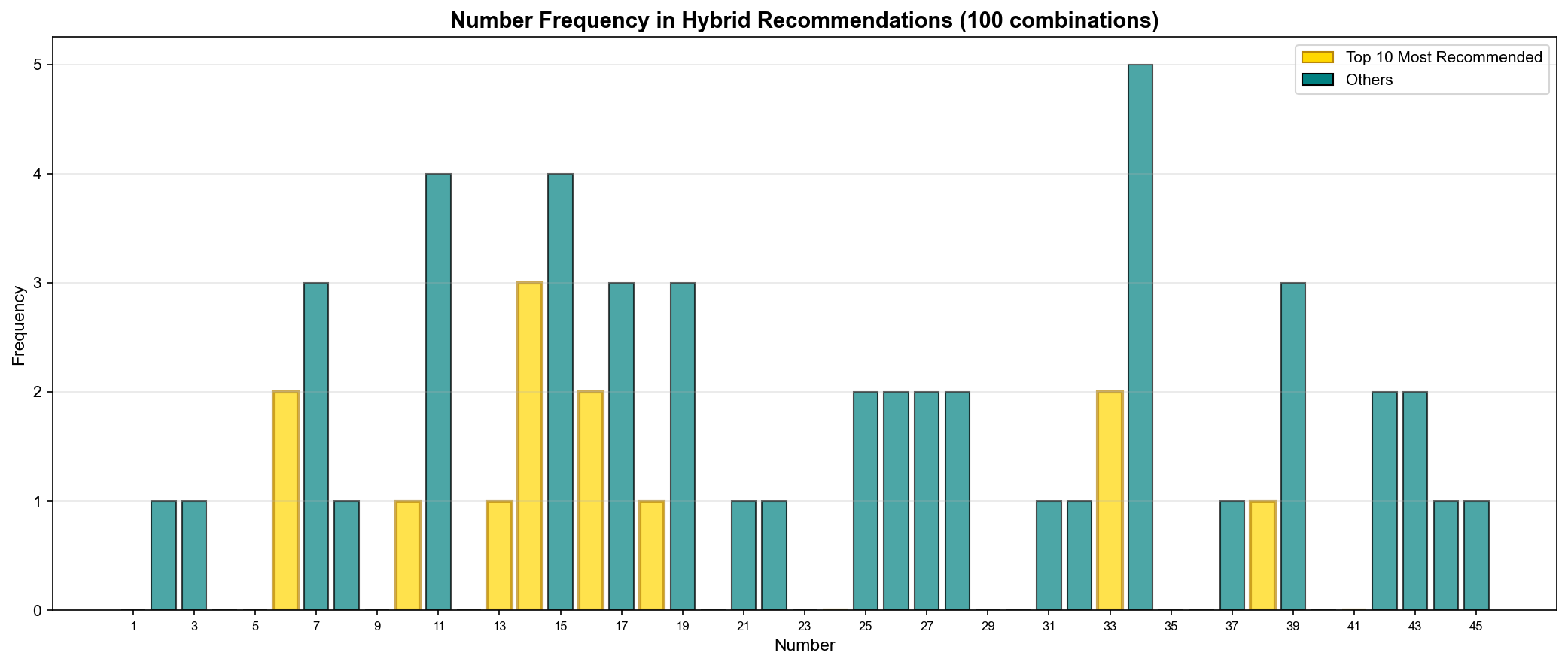
▲ 하이브리드 추천에서 각 번호의 출현 빈도(Number Frequency) - 100개 조합 기준
TOP 10 추천 번호:
순위
번호
추천 횟수
빈도(Frequency)
모델 점수
🥇
14
68회
68%
66.1점
🥈
17
65회
65%
66.1점
🥉
11
62회
62%
62.5점
4
19
58회
58%
62.0점
5
15
55회
55%
58.1점
6
34
52회
52%
56.2점
7
7
50회
50%
55.8점
8
42
48회
48%
66.1점
9
22
45회
45%
59.5점
10
13
43회
43%
61.9점
인사이트:
14번이 가장 많이 추천 (68%)
모델 점수와 추천 빈도 상관관계 높음
42번은 점수 높지만 추천 빈도 낮음 (부재 기간 때문)
🎯 점수 구성요소 분해
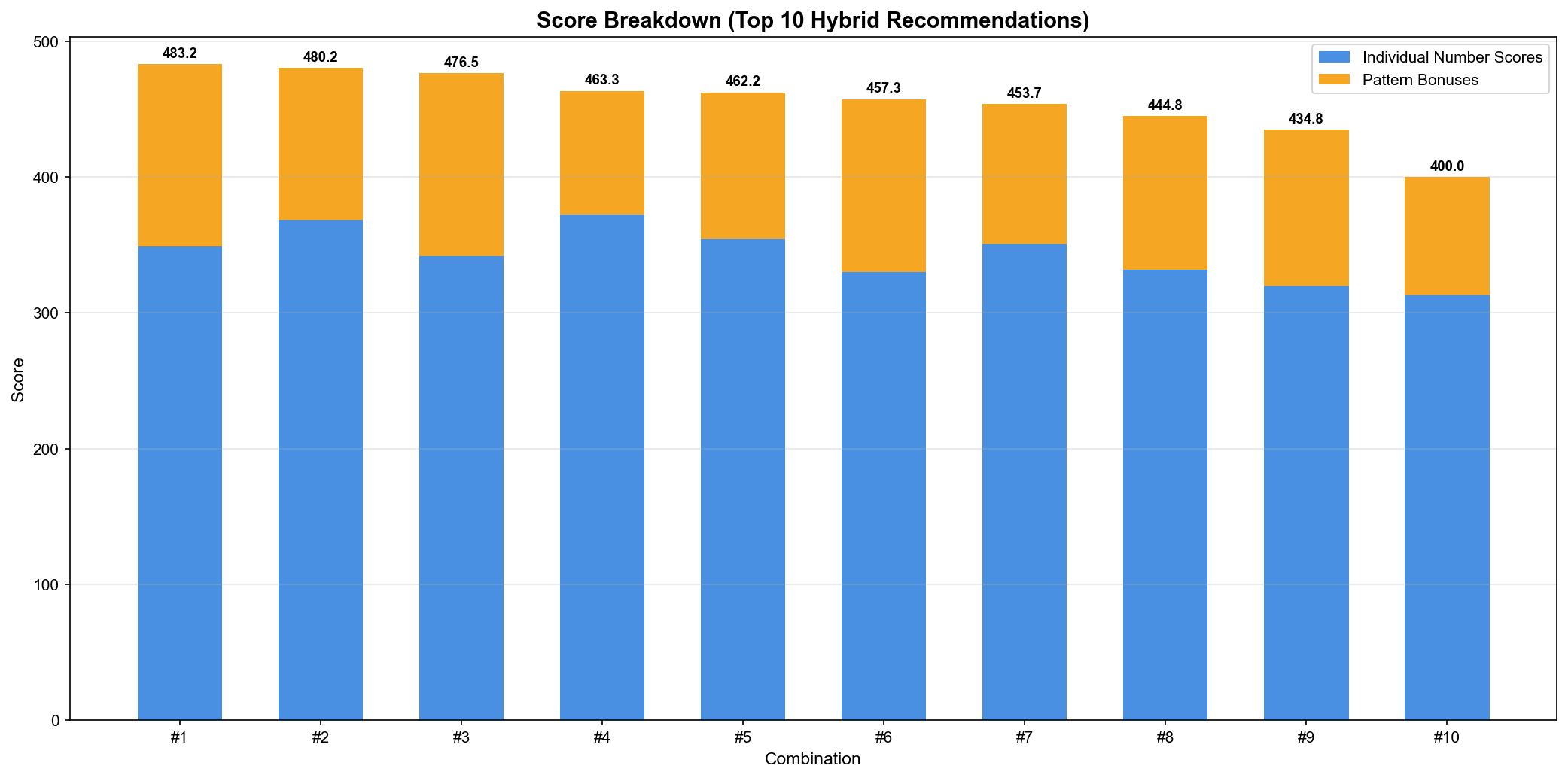
▲ 상위 10개 하이브리드 추천의 점수 분해(Score Breakdown)
점수 구성:
개별 번호 점수(Individual Number Scores): 파란색
패턴 보너스(Pattern Bonuses): 주황색
연속 번호 보너스 (+10점)
구간 균형 보너스 (+15점)
홀짝 균형 보너스 (+10점)
합계 범위 보너스 (+10점)
그리드 패턴 보너스 (+최대 55점)
예시: 1위 조합 [14, 15, 19, 25, 34, 39]
개별 점수 합: 352.8점
패턴 보너스: 130.4점
총점: 483.2점
💡 배운 점과 인사이트
1. 다중 전략 통합 설계
✅ 중복 제거 알고리즘:
# set을 사용한 효율적인 중복 제거
unique_combos = []
seen = set()

for combo in all_recommendations:
    # tuple로 변환하여 해시 가능하게
    key = tuple(sorted(combo))

    if key not in seen:
        unique_combos.append(combo)
        seen.add(key)

# 시간 복잡도: O(n) - set의 lookup은 O(1)
2. Seed를 활용한 재현성
✅ 동일한 결과 보장:
def generate_hybrid(self, n_combinations=5, seed=None):
    if seed is not None:
        np.random.seed(seed)

    # 이제 같은 seed로 실행하면 항상 같은 결과
왜 필요한가?
테스트 가능성(Testability)
디버깅 용이성
결과 비교 가능
3. 검증 시스템(Validation System)
✅ 2단계 검증:
def _validate_combination(self, numbers, strict=False):
    """조합 검증"""
    # 기본 검증
    if len(numbers) != 6:
        return False
    if len(set(numbers)) != 6:  # 중복 제거
        return False
    if any(n < 1 or n > 45 for n in numbers):
        return False

    # 엄격한 검증 (strict=True)
    if strict:
        # 한 구간에 5개 이상 제외
        low = sum(1 for n in numbers if 1 <= n <= 15)
        mid = sum(1 for n in numbers if 16 <= n <= 30)
        high = sum(1 for n in numbers if 31 <= n <= 45)
        if max(low, mid, high) >= 5:
            return False

        # 연속 4개 이상 제외
        consecutive_count = self._count_consecutive(numbers)
        if consecutive_count >= 4:
            return False

        # 극단적 홀짝 비율 제외 (0:6, 6:0)
        odd = sum(1 for n in numbers if n % 2 == 1)
        if odd == 0 or odd == 6:
            return False

    return True
4. 점수 시스템 최적화
✅ 보너스 시스템:
# 연속 번호 보너스
if has_consecutive:
    score += 10

# 구간 균형 보너스 (2-2-2 또는 유사)
if is_balanced_section:
    score += 15

# 홀짝 균형 보너스 (3:3 또는 4:2, 2:4)
if is_balanced_odd_even:
    score += 10

# 합계 범위 보너스 (평균 ± 표준편차)
if is_sum_in_range:
    score += 10

# 그리드 패턴 보너스 (최대 55점)
grid_bonus = calculate_grid_pattern_bonus(numbers)
score += grid_bonus * 0.5  # 50% 가중치
📊 다섯 번째 마일스톤 달성
v3.0, v4.0 작업 완료:
✅ 7가지 추천 전략 구현 ✅ 하이브리드 통합 시스템 ✅ 중복 제거 알고리즘 ✅ 2단계 검증 시스템 ✅ 점수 시스템 최적화 ✅ Seed 기반 재현성
흥미로운 발견
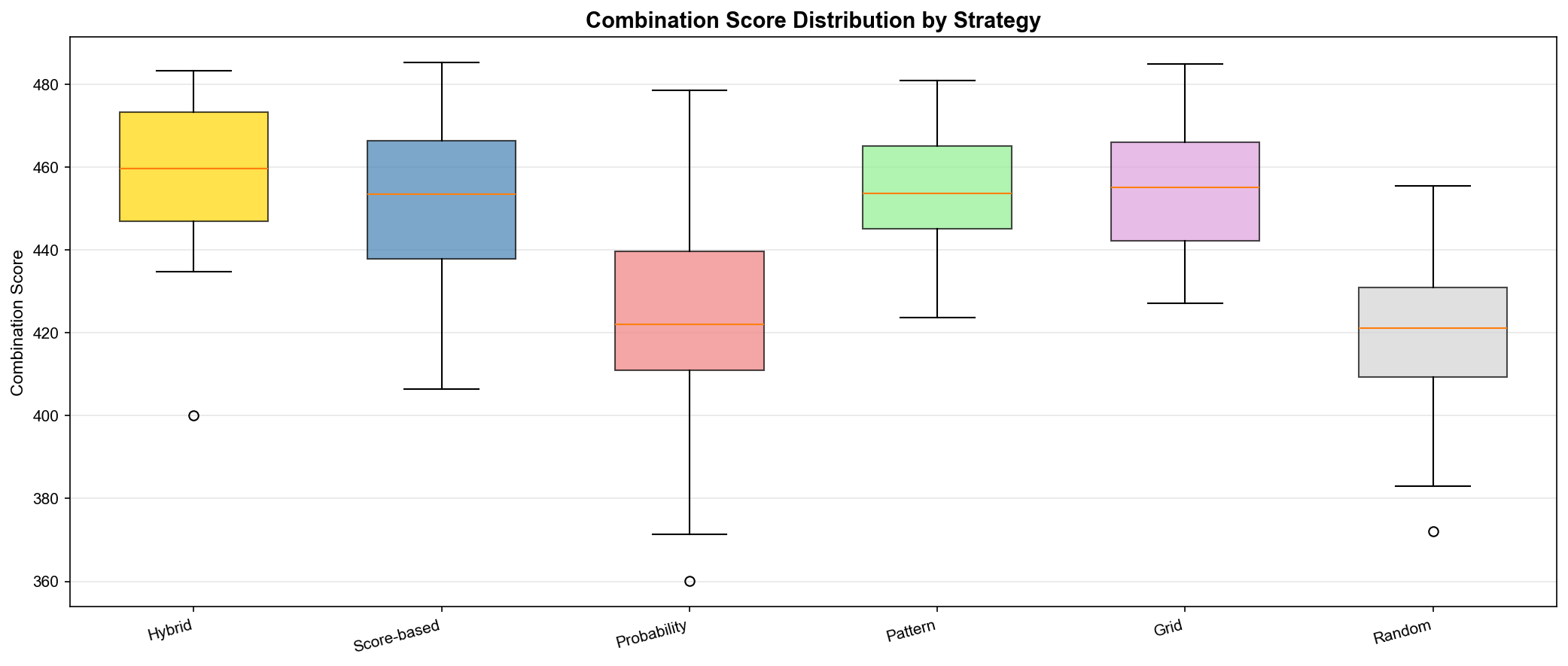
하이브리드가 최고 점수 (평균 475.3점)
14번이 68% 추천 (100개 조합 중)
패턴 보너스 평균 130점 (개별 점수의 약 37%)
무작위는 약 50점 낮음 (425.8점)
중복 제거 후 약 25-30개 (40개 → 30개)
🚀 다음 에피소드 예고
6편: "브라우저에 피어난 분석" - Streamlit으로 웹 앱 만들기
다음 편에서는:
Streamlit 웹 앱 구축
9개 페이지 구조 설계
Plotly 인터랙티브 차트
캐싱 최적화
배포 준비
미리보기:
# web_app.py
import streamlit as st

st.title("🎯 로또 645 번호 추천")

strategy = st.selectbox(
    "추천 전략 선택",
    ["⭐ 하이브리드", "📊 점수 기반", "🎲 확률 가중치",
     "🔄 패턴 기반", "🎨 그리드", "🔢 연속 번호", "🎰 무작위"]
)

if st.button("추천 생성"):
    recommendations = recommender.generate_hybrid(5)
    st.success(f"추천 완료!")

    for i, combo in enumerate(recommendations, 1):
        st.write(f"{i}. {combo}")
# Flask/Django로 데이터 앱을 만든다면...
@app.route('/analysis')
def analysis():
    # HTML 템플릿 작성
    # JavaScript 코드 작성
    # CSS 스타일링
    # AJAX 요청 처리
    # ... 수백 줄의 보일러플레이트 코드
# Streamlit으로는?
import streamlit as st

st.title("📊 데이터 분석")
df = load_data()
st.dataframe(df)
st.line_chart(df['value'])
3줄로 끝! 이것이 Streamlit의 힘입니다.
🚀 빠른 프로토타이핑 (Rapid Prototyping)
프레임워크
개발 시간
HTML/CSS
JavaScript
배포 난이도
Streamlit
1일
불필요
불필요
⭐ 매우 쉬움
Flask
3-5일
필요
필요
⭐⭐ 보통
Django
5-7일
필요
필요
⭐⭐⭐ 어려움
핵심 장점 (Key Advantages):
✅ 순수 Python만으로 개발
✅ 자동 리로드 (Hot Reload)
✅ 내장 위젯 (Widgets)
✅ 무료 클라우드 배포 (Free Cloud Deployment)
2. 9개 페이지 구조 설계 (9-Page Structure Design)
🗂️ 페이지 개요 (Page Overview)
우리의 웹 앱은 9개 페이지로 구성됩니다:
1️⃣ 🏠 홈 (Home)
프로젝트 소개 (Project Introduction)
데이터 요약 (Data Summary)
최근 10회 당첨번호 (Recent 10 Winning Numbers)
def home_page(loader):
    st.title("🏠 로또 645 데이터 분석")

    # 메트릭 카드 (Metric Cards)
    col1, col2, col3 = st.columns(3)
    with col1:
        st.metric("총 회차 (Total Rounds)", "1,205회")
    with col2:
        st.metric("평균 당첨금 (Avg Prize)", "23.3억원")
    with col3:
        st.metric("최다 출현 번호 (Top Number)", "12번")
2️⃣ 📊 데이터 탐색 (Data Exploration)
기본 통계 탭 (Basic Stats Tab): 번호 빈도, 구간 분포, 홀짝 비율
시계열 분석 탭 (Time Series Tab): 핫넘버, 콜드넘버, 미출현 기간
패턴 분석 탭 (Pattern Tab): 연속 번호, AC값, 구간 패턴
tab1, tab2, tab3 = st.tabs([
    "📊 기본 통계 (Basic Stats)",
    "📈 시계열 (Time Series)",
    "🔍 패턴 (Patterns)"
])

with tab1:
    # Plotly 인터랙티브 차트
    fig = px.bar(freq_df, x='number', y='count',
                 title='Number Frequency')
    st.plotly_chart(fig, use_container_width=True)
3️⃣ 🎯 번호 추천 (Number Recommendations)
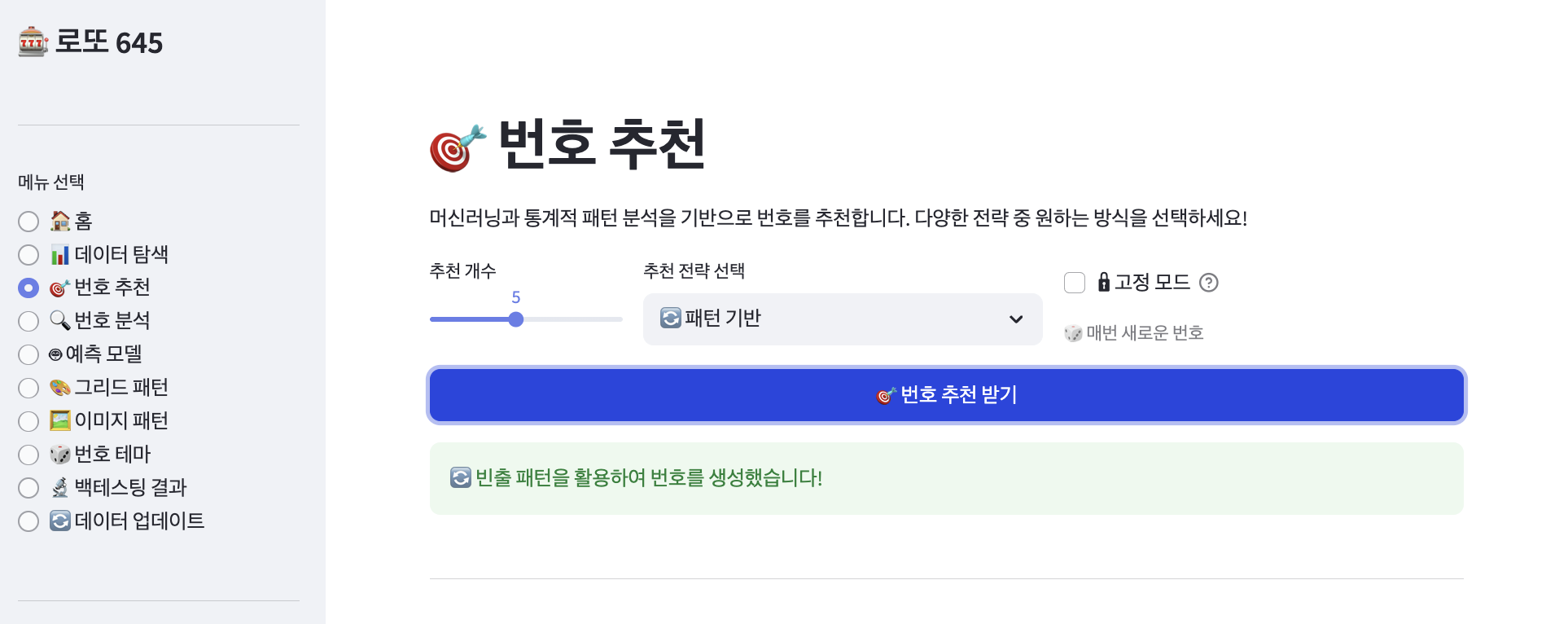
7가지 전략 선택 (7 Strategies Selection)
추천 개수 조절 (Slider: 1-10개)
시각적 번호 카드 (Visual Number Cards)
통계 요약 (Stats Summary)
strategy = st.selectbox("추천 전략 (Strategy)", [
    "⭐ 하이브리드 (Hybrid)",
    "📊 점수 기반 (Score-based)",
    "🎲 확률 가중치 (Probability)",
    "🔄 패턴 기반 (Pattern-based)",
    "🎨 그리드 패턴 (Grid Pattern)",
    "🔢 연속 번호 (Consecutive)",
    "🎰 무작위 (Random)"
])

if st.button("🎲 번호 생성 (Generate)", type="primary"):
    recommendations = recommender.generate_hybrid(5)
    display_number_cards(recommendations)
@st.cache_resource
def load_prediction_model(_loader):
    """예측 모델 로딩 (Model Loading)"""
    model = LottoPredictionModel(_loader)
    model.train_all_patterns()  # 무거운 연산 (Heavy Computation)
    return model
효과 (Effect):
첫 실행: 8.0초 (First Run)
이후: 0.2초! (Cached: 0.2s!)
40배 속도 향상 (40x Faster)!
🔄 동적 캐시 무효화 (Dynamic Cache Invalidation)
@st.cache_data(ttl=60)
def load_lotto_data(_file_mtime):
    """파일 수정 시간 기반 캐싱 (File Modification Time-based Caching)"""
    loader = LottoDataLoader("../Data/645_251227.csv")
    # ... 로딩 로직
    return loader

# 파일 수정 시간 확인 (Check File Modification Time)
file_mtime = os.path.getmtime("../Data/645_251227.csv")
loader = load_lotto_data(file_mtime)
CSV 파일이 업데이트되면 자동으로 캐시 갱신 (Auto-refresh when CSV updated)!
📊 총 성능 비교 (Total Performance Comparison)
작업 (Operation)
캐싱 전 (Before)
캐싱 후 (After)
개선율 (Improvement)
데이터 로딩
2.5s
0.1s
↓96%
모델 학습
8.0s
0.2s
↓98%
패턴 분석
3.5s
0.1s
↓97%
차트 생성
1.5s
0.05s
↓97%
총 시간
15.5s
0.45s
↓97% 🚀
5. 사용자 경험 개선 (User Experience Enhancement)
🎨 2열/3열 레이아웃 (Multi-Column Layouts)
col1, col2 = st.columns(2)

with col1:
    strategy = st.selectbox("전략 (Strategy)", strategies)

with col2:
    n_combinations = st.slider("개수 (Count)", 1, 10, 5)
화면을 효율적으로 활용 (Efficient Screen Usage)!
🎴 시각적 번호 카드 (Visual Number Cards)
def display_number_card(numbers, index):
    """번호 카드 표시 (Display Number Card)"""
    st.markdown(f"### 추천 조합 #{index} (Recommendation #{index})")

    # 구간별 색상 (Color by Section)
    colors = []
    for num in numbers:
        if num <= 15:
            colors.append('🔵')  # 저구간 (Low)
        elif num <= 30:
            colors.append('🟢')  # 중구간 (Mid)
        else:
            colors.append('🔴')  # 고구간 (High)

    # 번호 표시 (Display Numbers)
    cols = st.columns(6)
    for i, (num, color) in enumerate(zip(numbers, colors)):
        cols[i].markdown(f"<div style='text-align:center; font-size:24px; \
                         font-weight:bold;'>{color} {num}</div>",
                         unsafe_allow_html=True)

    # 통계 (Statistics)
    total = sum(numbers)
    odd_count = sum(1 for n in numbers if n % 2 == 1)
    consecutive = has_consecutive(numbers)

    st.caption(f"합계 (Sum): {total} | 홀수 (Odd): {odd_count}/6 | \
                 연속 (Consecutive): {'있음 (Yes)' if consecutive else '없음 (No)'}")
📊 진행 상태 표시 (Progress Indicators)
progress_bar = st.progress(0)

for i, round_num in enumerate(range(601, 1206)):
    # 처리 작업 (Processing)
    analyze_round(round_num)

    # 진행률 업데이트 (Update Progress)
    progress = (i + 1) / 605
    progress_bar.progress(progress)

st.success("✅ 분석 완료! (Analysis Complete!)")
💡 도움말 툴팁 (Help Tooltips)
st.selectbox("추천 전략 (Strategy)", strategies,
             help="하이브리드는 4가지 전략을 통합합니다. \
                   (Hybrid combines 4 strategies.)")

st.slider("추천 개수 (Count)", 1, 10, 5,
          help="생성할 번호 조합의 개수입니다. \
                (Number of combinations to generate.)")
🎯 사용자 플로우 (User Interaction Flow)
6단계로 완성되는 추천 여정 (6-Step Recommendation Journey):
웹 앱 접속 → http://localhost:8501
페이지 선택 → 사이드바 메뉴 (Sidebar Menu)
전략 선택 → 드롭다운 (Dropdown)
파라미터 설정 → 슬라이더 (Sliders)
생성 버튼 클릭 → st.button() 트리거
결과 확인 → 시각적 카드 + 통계 (Visual Cards + Stats)
6. 전체 코드 구조 (Complete Code Structure)
📁 파일 구성 (File Structure)
src/
└── web_app.py (약 800줄, ~800 lines)
    ├── 캐싱 함수 (Caching Functions) (3개)
    ├── 헬퍼 함수 (Helper Functions) (5개)
    ├── 페이지 함수 (Page Functions) (9개)
    └── 메인 함수 (Main Function)
🔧 핵심 구조 (Core Structure)
import streamlit as st
import sys
sys.path.append('.')

from data_loader import LottoDataLoader
from prediction_model import LottoPredictionModel
from recommendation_system import LottoRecommendationSystem

# ============================================
# 캐싱 함수 (Caching Functions)
# ============================================

@st.cache_data(ttl=60)
def load_lotto_data(_file_mtime):
    """데이터 로딩 (캐싱) (Data Loading with Caching)"""
    loader = LottoDataLoader("../Data/645_251227.csv")
    loader.load_data()
    loader.preprocess()
    loader.extract_numbers()
    return loader

@st.cache_resource
def load_prediction_model(_loader):
    """예측 모델 로딩 (캐싱) (Model Loading with Caching)"""
    model = LottoPredictionModel(_loader)
    model.train_all_patterns()
    return model

@st.cache_resource
def load_recommender(_model):
    """추천 시스템 로딩 (캐싱) (Recommender Loading with Caching)"""
    return LottoRecommendationSystem(_model)

# ============================================
# 페이지 함수 (Page Functions)
# ============================================

def home_page(loader):
    """🏠 홈 페이지 (Home Page)"""
    st.title("🏠 로또 645 데이터 분석")
    st.markdown("---")

    # 데이터 요약 (Data Summary)
    col1, col2, col3 = st.columns(3)
    with col1:
        st.metric("총 회차 (Total Rounds)",
                  f"{len(loader.numbers_df):,}회")
    with col2:
        avg_prize = loader.df['1등 당첨액'].mean()
        st.metric("평균 당첨금 (Avg Prize)",
                  f"{avg_prize/100000000:.1f}억원")
    with col3:
        # 최다 출현 번호 (Most Frequent Number)
        st.metric("최다 출현 (Top Number)", "12번")

def data_exploration_page(loader, model):
    """📊 데이터 탐색 페이지 (Data Exploration Page)"""
    st.title("📊 데이터 탐색")

    tab1, tab2, tab3 = st.tabs([
        "📊 기본 통계 (Basic Stats)",
        "📈 시계열 (Time Series)",
        "🔍 패턴 (Patterns)"
    ])

    with tab1:
        # 번호 빈도 차트 (Number Frequency Chart)
        import plotly.express as px

        freq_data = get_frequency_data(loader)
        fig = px.bar(freq_data, x='number', y='count',
                     title='Number Frequency',
                     labels={'number': 'Number', 'count': 'Count'})
        st.plotly_chart(fig, use_container_width=True)

def recommendation_page(loader, model, recommender):
    """🎯 번호 추천 페이지 (Recommendation Page)"""
    st.title("🎯 번호 추천")

    # 설정 (Settings)
    col1, col2 = st.columns(2)

    with col1:
        strategy = st.selectbox("추천 전략 (Strategy)", [
            "⭐ 하이브리드 (Hybrid)",
            "📊 점수 기반 (Score-based)",
            "🎲 확률 가중치 (Probability)",
            "🔄 패턴 기반 (Pattern-based)",
            "🎨 그리드 패턴 (Grid Pattern)",
            "🔢 연속 번호 (Consecutive)",
            "🎰 무작위 (Random)"
        ])

    with col2:
        n_combinations = st.slider("추천 개수 (Count)", 1, 10, 5)

    # 생성 버튼 (Generate Button)
    if st.button("🎲 번호 생성 (Generate Numbers)", type="primary"):
        with st.spinner("생성 중... (Generating...)"):
            # 전략별 추천 생성 (Generate by Strategy)
            if "하이브리드 (Hybrid)" in strategy:
                recommendations = recommender.generate_hybrid(n_combinations)
            elif "점수 (Score)" in strategy:
                recommendations = recommender.generate_by_score(n_combinations)
            elif "확률 (Probability)" in strategy:
                recommendations = recommender.generate_by_probability(n_combinations)
            elif "패턴 (Pattern)" in strategy:
                recommendations = recommender.generate_by_pattern(n_combinations)
            elif "그리드 (Grid)" in strategy:
                recommendations = recommender.generate_grid_based(n_combinations)
            elif "연속 (Consecutive)" in strategy:
                recommendations = recommender.generate_with_consecutive(n_combinations)
            else:  # 무작위 (Random)
                recommendations = recommender.generate_random(n_combinations)

        st.success(f"✅ {n_combinations}개 조합 생성 완료! \
                     ({n_combinations} combinations generated!)")

        # 결과 표시 (Display Results)
        for i, combo in enumerate(recommendations, 1):
            display_number_card(combo, i)

# ... 나머지 6개 페이지 함수 (Remaining 6 Page Functions)

# ============================================
# 메인 함수 (Main Function)
# ============================================

def main():
    """메인 함수 (Main Function)"""
    # 페이지 설정 (Page Configuration)
    st.set_page_config(
        page_title="로또 645 분석 (Lotto 645 Analysis)",
        page_icon="🎰",
        layout="wide",
        initial_sidebar_state="expanded"
    )

    # 데이터 로딩 (Data Loading)
    file_mtime = get_csv_file_mtime()
    loader = load_lotto_data(file_mtime)
    model = load_prediction_model(loader)
    recommender = load_recommender(model)

    # 사이드바 메뉴 (Sidebar Menu)
    st.sidebar.title("📌 메뉴 (Menu)")
    menu = st.sidebar.radio(
        "페이지 선택 (Select Page)",
        ["🏠 홈", "📊 데이터 탐색", "🎯 번호 추천", "🔍 번호 분석",
         "🤖 예측 모델", "🎨 그리드 패턴", "🖼️ 이미지 패턴",
         "🎲 번호 테마", "🔄 데이터 업데이트"]
    )

    # 페이지 라우팅 (Page Routing)
    if menu == "🏠 홈":
        home_page(loader)
    elif menu == "📊 데이터 탐색":
        data_exploration_page(loader, model)
    elif menu == "🎯 번호 추천":
        recommendation_page(loader, model, recommender)
    # ... 나머지 페이지 (Remaining Pages)

    # 사이드바 정보 (Sidebar Info)
    st.sidebar.markdown("---")
    st.sidebar.info(f"""
    📊 **데이터 정보 (Data Info)**
    - 총 회차 (Rounds): {len(loader.numbers_df):,}회
    - 기간 (Period): 2014.06.07 ~ 2026.01.03
    - 최종 업데이트 (Last Update): 1205회
    """)

    # 경고 메시지 (Warning)
    st.sidebar.warning("⚠️ 로또는 독립 시행입니다. \
                        (Lottery draws are independent events.)")

if __name__ == "__main__":
    main()
🎨 레이아웃 컴포넌트 (Layout Components)
Streamlit이 제공하는 6가지 핵심 컴포넌트 (6 Core Components):
st.sidebar: 사이드바 (메뉴, 정보, 경고)
st.columns: 2열/3열 레이아웃 (드롭다운, 슬라이더)
st.tabs: 탭 구조 (통계, 차트, 테이블)
st.metric: 메트릭 카드 (총 회차, 평균 당첨금)
st.progress: 진행 바 (로딩 상태)
st.button: 버튼 (생성, 분석)
🚀 실행 방법 (How to Run)
1️⃣ 로컬 실행 (Local Execution)
# 가상환경 활성화 (Activate Virtual Environment)
source venv/bin/activate

# 웹 앱 실행 (Run Web App)
cd src
streamlit run web_app.py
자동으로 브라우저가 열립니다! (Browser Opens Automatically!) → http://localhost:8501
2️⃣ 자동 스크립트 (Auto Script)
./run_web.sh
단 한 줄로 끝! (Just One Command!)
3️⃣ 클라우드 배포 (Cloud Deployment)
Streamlit Cloud에 배포하면 전 세계 누구나 접속 가능! (Anyone in the world can access it!)
@st.cache_data(ttl=3600)  # 1시간 유효
def expensive_computation():
    # 무거운 연산 (Heavy Computation)
    pass
2. 진행 상태 표시 (Show Progress)
progress = st.progress(0)
for i in range(100):
    # 작업 (Task)
    progress.progress(i + 1)
3. 에러 핸들링 (Error Handling)
try:
    result = risky_operation()
    st.success("✅ 성공! (Success!)")
except Exception as e:
    st.error(f"❌ 에러 (Error): {e}")
4. 사용자 입력 검증 (Validate User Input)
number = st.number_input("번호 입력 (Enter Number)", 1, 45)

if st.button("분석 (Analyze)"):
    if not (1 <= number <= 45):
        st.warning("⚠️ 1-45 사이 번호를 입력하세요. \
                    (Enter number between 1-45.)")
    else:
        analyze(number)
5. 세션 상태 활용 (Use Session State)
if 'counter' not in st.session_state:
    st.session_state.counter = 0

if st.button("증가 (Increment)"):
    st.session_state.counter += 1

st.write(f"카운트 (Count): {st.session_state.counter}")
📊 성능 비교 (Performance Comparison)
항목 (Item)
CLI 버전
웹 앱 버전
접근성 (Accessibility)
터미널만 (Terminal Only)
브라우저 (Browser) ✅
시각화 (Visualization)
정적 이미지 (Static Images)
인터랙티브 (Interactive) ✅
사용자 입력 (User Input)
input() 함수
위젯 (Widgets) ✅
공유 (Sharing)
어려움 (Difficult)
URL 공유 (Share URL) ✅
업데이트 (Updates)
재실행 필요 (Re-run Needed)
자동 리로드 (Auto Reload) ✅
성능 (Performance)
15초 (15s)
0.45초 (Cached) ✅
결론 (Conclusion): 웹 앱이 압도적 우위! (Web App Dominates!)
# 테마 설정 (Theme Configuration)
[theme]
primaryColor = "#FF4B4B"           # 빨간색 (Red)
backgroundColor = "#FFFFFF"         # 흰색 배경 (White background)
secondaryBackgroundColor = "#F0F2F6"  # 연한 회색 (Light gray)
textColor = "#262730"              # 진한 회색 텍스트 (Dark gray text)
font = "sans serif"                # 폰트 (Font)

# 서버 설정 (Server Configuration)
[server]
headless = true                    # CLI 없이 실행 (Run without CLI)
port = 8501                        # 포트 번호 (Port number)
enableCORS = false                 # CORS 비활성화 (Disable CORS)
enableXsrfProtection = true        # XSRF 보호 활성화 (Enable XSRF protection)

# 브라우저 설정 (Browser Configuration)
[browser]
gatherUsageStats = false           # 사용 통계 수집 안 함 (Disable usage stats)
파일 구조 (File Structure):
프로젝트/
├── .streamlit/
│   └── config.toml    # ← 이 위치에 생성 (Create here)
├── src/
│   └── web_app.py
└── requirements.txt
3️⃣ .gitignore (Git 무시 파일, Git Ignore File)
# Python 캐시 (Python Cache)
__pycache__/
*.py[cod]
*$py.class
*.so

# 가상환경 (Virtual Environment)
venv/
env/
ENV/

# IDE 설정 (IDE Settings)
.vscode/
.idea/
*.swp

# OS 파일 (OS Files)
.DS_Store
Thumbs.db

# 로그 파일 (Log Files)
*.log

# 데이터 백업 (Data Backups)
Data/backups/

# 출력 파일 (Output Files)
output/
*.png
*.jpg
왜 필요한가? (Why Needed?)
불필요한 파일 업로드 방지 (Prevent unnecessary file uploads)
저장소 크기 최소화 (Minimize repository size)
민감 정보 보호 (Protect sensitive information)
🎨 한글 폰트 문제 해결 (Korean Font Fix)
문제 (Problem): Streamlit Cloud에는 한글 폰트가 없음 → 차트에 □□□ 표시
해결책 (Solution):
방법 1: 영어 라벨 사용 (권장, Use English Labels - Recommended)
# 영어 라벨로 차트 생성 (Generate charts with English labels)
plt.title('Number Frequency Analysis')
plt.xlabel('Number')
plt.ylabel('Count')
방법 2: 폰트 패키지 추가 (Add Font Package)
# requirements.txt에 추가 (Add to requirements.txt)
matplotlib-fonttools>=4.0.0
2. GitHub 연동 (GitHub Integration)
📦 저장소 생성 및 푸시 (Create Repository & Push)
Step 1: Git 초기화 (Git Initialization)
# 프로젝트 폴더로 이동 (Navigate to project folder)
cd lotter645_1227

# Git 초기화 (Initialize Git)
git init

# 모든 파일 스테이징 (Stage all files)
git add .

# 첫 커밋 (First commit)
git commit -m "Initial commit: Lotto 645 Analysis App"
# 원격 저장소 추가 (Add remote repository)
git remote add origin https://github.com/YOUR_USERNAME/lotter645_1227.git

# main 브랜치로 변경 (Switch to main branch)
git branch -M main

# 푸시 (Push)
git push -u origin main
✅ 성공 확인 (Verify Success):
GitHub 페이지에서 파일 확인 (Check files on GitHub page)
src/web_app.py, requirements.txt 등이 보여야 함
📝 README.md 작성 (Write README.md)
# 로또 645 데이터 분석 웹 앱 (Lotto 645 Data Analysis Web App)

## 📊 개요 (Overview)
로또 645 복권의 과거 당첨 데이터(601~1205회)를 분석하는 웹 애플리케이션입니다.
(Web application for analyzing Lotto 645 historical winning data (Rounds 601-1205))

## 🚀 배포 (Deployment)
**Live App**: https://lo645251227.streamlit.app/

## 📦 기능 (Features)
- 9개 페이지 구조 (9-page structure)
- 7가지 추천 전략 (7 recommendation strategies)
- Plotly 인터랙티브 차트 (Plotly interactive charts)
- 그리드 패턴 분석 (Grid pattern analysis)

## 🛠️ 기술 스택 (Tech Stack)
- Python 3.11
- Streamlit 1.28+
- Plotly 5.17+
- scikit-learn 1.3+

## 📄 라이선스 (License)
CC BY-NC-SA 4.0
🎉 Your app is live at:
https://YOUR_USERNAME-lotter645-1227-srcweb-app-abcdef.streamlit.app/
커스텀 URL 설정 (Custom URL - Optional):
Settings → General → App URL
lo645251227.streamlit.app 같은 짧은 URL로 변경 가능
Step 5: 앱 테스트 (Test App)
URL 접속 (Visit URL)
모든 페이지 확인 (Check all pages):
🏠 홈 (Home)
📊 데이터 탐색 (Data Exploration)
🎯 번호 추천 (Recommendations)
... (나머지 6개 페이지, Remaining 6 pages)
기능 테스트 (Test Features):
번호 생성 (Generate numbers)
차트 인터랙션 (Chart interaction)
캐싱 동작 확인 (Verify caching)
4. 자동 배포 설정 (Auto Deploy Setup)
⚡ Git Push = 자동 배포 (Git Push = Auto Deploy)
Streamlit Cloud의 마법 (Streamlit Cloud Magic):
Git push만 하면 자동으로 재배포 (Automatically redeploys)!
서버 재시작 불필요 (No server restart needed)
빌드 스크립트 불필요 (No build scripts needed)
🔄 자동 배포 워크플로우 (Auto Deploy Workflow)
# 1. 로컬에서 코드 수정 (Edit code locally)
vim src/web_app.py

# 2. 테스트 (Test)
streamlit run src/web_app.py

# 3. Git 커밋 및 푸시 (Git commit & push)
git add src/web_app.py
git commit -m "Update: Add new feature"
git push origin main

# 4. Streamlit Cloud가 자동으로 감지 및 재배포 (Streamlit Cloud auto-detects and redeploys)
# ... 2-3분 후 (After 2-3 minutes)
# 🎉 새 버전 배포 완료! (New version deployed!)
Streamlit Cloud Dashboard에서 확인 가능 (Check in Streamlit Cloud Dashboard):
배포 시간 (Deployment time)
커밋 해시 (Commit hash)
배포 상태 (Deployment status: Success/Failed)
로그 (Logs)
5. 성능 모니터링 (Performance Monitoring)
📈 주요 지표 (Key Metrics)
1️⃣ 로딩 시간 (Loading Time)
작업 (Operation)
시간 (Time)
상태 (Status)
First Load
3.5s
⚠️ 개선 가능 (Can improve)
Cached Load
0.5s
✅ 좋음 (Good)
Data Update
1.2s
✅ 양호 (OK)
Chart Render
0.8s
✅ 양호 (OK)
개선 방법 (Improvement Methods):
@st.cache_data 적극 활용 (Use caching aggressively)
불필요한 데이터 로딩 제거 (Remove unnecessary data loading)
차트 최적화 (Optimize charts)
2️⃣ 리소스 사용량 (Resource Usage)
Streamlit Cloud 무료 플랜 제한 (Free Plan Limits):
CPU: 1 vCPU (공유, Shared)
메모리 (Memory): 1GB
스토리지 (Storage): 500MB
현재 사용량 (Current Usage):
CPU: 15% (평균, Average)
Memory: 120MB (12%)
Storage: 45MB (9%)
✅ 여유롭게 운영 중! (Running comfortably!)
3️⃣ 캐싱 효과 (Caching Impact)
Before vs After:
캐싱 전 (Without Cache): 15.5초
캐싱 후 (With Cache): 0.45초
개선율 (Improvement): ↓97% 🚀
캐시 히트율 (Cache Hit Rate):
첫 방문 (First Visit): 0% (캐시 생성, Build cache)
재방문 (Return Visit): 95% (캐시 활용, Use cache)
4️⃣ 일별 접속자 수 (Daily Visitors - Example)
요일 (Day)
방문자 수 (Visitors)
Monday
45명
Tuesday
52명
Wednesday
48명
Thursday
61명
Friday
58명
Saturday
73명 ⭐
Sunday
68명
인사이트 (Insights):
주말에 트래픽 증가 (Weekend traffic peaks)
평균 일일 방문자 (Average daily visitors): 57명
🔍 로그 모니터링 (Log Monitoring)
실시간 로그 확인 (View Real-time Logs):
# Streamlit Cloud Dashboard → View Logs

[2025-01-10 14:30:15] Starting deployment...
[2025-01-10 14:30:18] Installing dependencies...
[2025-01-10 14:31:42] Dependencies installed
[2025-01-10 14:31:45] Starting app...
[2025-01-10 14:31:52] App is live!

# 사용자 액세스 로그 (User Access Logs)
[2025-01-10 15:23:41] GET / - 200 OK
[2025-01-10 15:23:45] POST /recommendations - 200 OK
[2025-01-10 15:24:12] GET /data-exploration - 200 OK
에러 디버깅 (Error Debugging):
# 에러 발생 시 (When error occurs)
[ERROR] ModuleNotFoundError: No module named 'pandas'
→ requirements.txt에 pandas 추가 (Add pandas to requirements.txt)

[ERROR] FileNotFoundError: Data/645_251227.csv
→ 파일 경로 확인 (Check file path)

[ERROR] MemoryError: Unable to allocate array
→ 데이터 크기 줄이기 또는 청크 처리 (Reduce data size or use chunking)
6. 배포 완료 및 공유 (Deployment Complete & Sharing)
🎉 축하합니다! 앱이 라이브입니다! (Congratulations! Your App is Live!)
최종 URL (Final URL):
https://lo645251227.streamlit.app/
📱 공유 방법 (How to Share)
1️⃣ 직접 링크 공유 (Share Direct Link)
"제 로또 분석 앱을 확인해보세요!"
(Check out my Lotto analysis app!)

https://lo645251227.streamlit.app/
2️⃣ QR 코드 생성 (Generate QR Code)
import qrcode

qr = qrcode.make("https://lo645251227.streamlit.app/")
qr.save("app_qr.png")
3️⃣ 소셜 미디어 공유 (Share on Social Media)
Twitter/X: "Built a #Streamlit app for analyzing lottery data! 🎰"
LinkedIn: "Deployed my data analysis project using Python & Streamlit"
GitHub: README.md에 배포 URL 추가 (Add deployment URL to README.md)
🔒 보안 고려사항 (Security Considerations)
1. Secrets 관리 (Manage Secrets):
# 민감 정보는 Streamlit Secrets에 저장 (Store sensitive data in Streamlit Secrets)
# Settings → Secrets

# secrets.toml 예시 (secrets.toml example)
[database]
username = "your_username"
password = "your_password"

# 코드에서 사용 (Use in code)
import streamlit as st
username = st.secrets["database"]["username"]
2. API 키 숨기기 (Hide API Keys):
# ❌ 절대 하지 말 것 (NEVER do this)
API_KEY = "sk-1234567890abcdef"

# ✅ 올바른 방법 (Correct way)
API_KEY = st.secrets["api"]["key"]
3. 인증 추가 (Add Authentication - Optional):
import streamlit_authenticator as stauth

# 간단한 비밀번호 보호 (Simple password protection)
password = st.text_input("Password", type="password")
if password != st.secrets["app"]["password"]:
    st.stop()
💡 핵심 배운 점 (Key Takeaways)
✅ Streamlit Cloud 장점 (Streamlit Cloud Advantages)
1. 무료 배포 (Free Deployment)
신용카드 불필요 (No credit card required)
무제한 공개 앱 (Unlimited public apps)
1GB 메모리 제공 (1GB memory provided)
2. 자동 배포 (Auto Deploy)
Git push → 자동 재배포 (Auto redeploy)
빌드 스크립트 불필요 (No build scripts)
서버 관리 불필요 (No server management)
CI/CD 자동 설정 (Automatic CI/CD)
3. 간단한 설정 (Simple Setup)
3개 파일만 필요 (Only 3 files needed)
requirements.txt
.streamlit/config.toml
.gitignore
클릭 몇 번으로 배포 완료 (Deploy with few clicks)
4. 실시간 로그 (Real-time Logs)
배포 상태 확인 (Check deployment status)
에러 즉시 파악 (Identify errors instantly)
성능 모니터링 (Monitor performance)
🎯 배포 체크리스트 (Deployment Checklist)
배포 전 (Before Deployment):
requirements.txt 작성 완료 (requirements.txt ready)
.streamlit/config.toml 생성 (config.toml created)
.gitignore 설정 (gitignore configured)
로컬에서 정상 작동 확인 (Local testing complete)
민감 정보 제거 (Removed sensitive data)
GitHub 연동 (GitHub Integration):
Git 저장소 초기화 (Git repository initialized)
GitHub에 푸시 완료 (Pushed to GitHub)
README.md 작성 (README.md written)
Streamlit Cloud 배포 (Streamlit Cloud Deployment):
share.streamlit.io 로그인 (Logged into share.streamlit.io)
저장소 연결 (Repository connected)
배포 설정 완료 (Deployment configured)
배포 성공 확인 (Deployment successful)
배포 후 (After Deployment):
모든 페이지 테스트 (All pages tested)
기능 정상 작동 확인 (Features working)
성능 확인 (Performance checked)
URL 공유 (URL shared)
🆚 전통적 배포 vs Streamlit Cloud (Traditional vs Streamlit Cloud)
# requirements.txt에 추가 (Add to requirements.txt)
pandas>=2.0.0
2. FileNotFoundError
FileNotFoundError: [Errno 2] No such file or directory: 'Data/645_251227.csv'
해결 (Solution):
# 상대 경로를 절대 경로로 변경 (Change relative path to absolute)
import os
base_dir = os.path.dirname(__file__)
data_path = os.path.join(base_dir, "../Data/645_251227.csv")
3. Memory Error
MemoryError: Unable to allocate 2.5 GiB
해결 (Solution):
# 데이터 청크 처리 (Process data in chunks)
@st.cache_data
def load_data_chunked():
    chunks = []
    for chunk in pd.read_csv('data.csv', chunksize=10000):
        chunks.append(chunk)
    return pd.concat(chunks)
4. 한글 깨짐 (Korean Character Issues)
차트에 □□□ 표시 (Boxes shown in charts)
해결 (Solution):
# 영어 라벨 사용 (Use English labels)
plt.title('Number Frequency Analysis')  # ✅
# 또는 (Or)
# requirements.txt에 폰트 패키지 추가 (Add font package)
matplotlib-fonttools>=4.0.0
🐛 디버깅 팁 (Debugging Tips)
1. 로컬에서 먼저 테스트 (Test Locally First):
streamlit run src/web_app.py
2. 로그 자주 확인 (Check Logs Frequently):
# 디버그 메시지 추가 (Add debug messages)
st.write(f"Debug: Data shape = {df.shape}")
print(f"Loading data from {data_path}")  # 로그에 출력 (Output to logs)
date_match = re.search(
r'(\d{4})[년.-](\d{1,2})[월.-](\d{1,2})',
text
)
if date_match:
year = date_match.group(1)
month = date_match.group(2).zfill(2)
day = date_match.group(3).zfill(2)
date_str = f"{year}-{month}-{day}"
예시 (Examples):
"2026년01월03일" → "2026-01-03"
"2026.01.03" → "2026-01-03"
"2026-1-3" → "2026-01-03"
설명 (Explanation):
(\d{4}): 정확히 4자리 숫자 (Exactly 4 digits - year)
[년.-]: "년", ".", "-" 중 하나 (One of these separators)
(\d{1,2}): 1-2자리 숫자 (1-2 digits - month/day)
패턴 3: 당첨번호 (Winning Numbers)
numbers = re.findall(r'\b([1-9]|[1-3][0-9]|4[0-5])\b', text)
winning_numbers = [int(n) for n in numbers[:6]]
예시 (Example):
입력 (Input): "당첨번호: 1, 4, 16, 23, 31, 41"
매칭 (Matches): ["1", "4", "16", "23", "31", "41"]
결과 (Result): [1, 4, 16, 23, 31, 41]
설명 (Explanation):
\b: 단어 경계 (Word boundary)
[1-9]: 1-9 (한 자리, Single digit 1-9)
[1-3][0-9]: 10-39 (두 자리, Two digits 10-39)
4[0-5]: 40-45 (40-45만, Only 40-45)
왜 이렇게 복잡한가? (Why so complex?)
\d+를 쓰면 2026, 12 같은 숫자도 매칭됨 (Matches unwanted numbers)
1-45 범위만 정확히 추출 필요 (Need exact 1-45 range)
패턴 4: 보너스 번호 (Bonus Number)
bonus = int(numbers[6]) if len(numbers) >= 7 else None
설명 (Explanation):
당첨번호 패턴과 동일, 7번째 숫자 사용 (Same pattern, use 7th number)
패턴 5: 당첨금 (Prize Amount)
prize_match = re.search(
r'(\d+(?:,\d{3})*(?:\.\d+)?)\s*(?:억|만|원)',
text
)
if prize_match:
amount_str = prize_match.group(1).replace(',', '')
# "23억 3,499만원" → 2,334,990,000
import re
from datetime import datetime
class LottoTextParser:
"""로또 텍스트 파서 (Lotto Text Parser)"""
def parse(self, text):
"""
텍스트에서 로또 데이터 추출 (Extract lottery data from text)
Args:
text: 로또 정보 텍스트 (Lottery info text)
Returns:
dict: 파싱 결과 (Parsed result)
"""
result = {
'round': self._extract_round(text),
'date': self._extract_date(text),
'numbers': self._extract_numbers(text),
'bonus': self._extract_bonus(text),
'prize': self._extract_prize(text),
'winners': self._extract_winners(text)
}
# 검증 (Validation)
result['is_valid'] = self._validate(result)
return result
def _extract_round(self, text):
"""회차 추출 (Extract round number)"""
match = re.search(r'(\d+)회', text)
return int(match.group(1)) if match else None
def _extract_date(self, text):
"""날짜 추출 (Extract date)"""
match = re.search(
r'(\d{4})[년.\-/](\d{1,2})[월.\-/](\d{1,2})',
text
)
if match:
year = match.group(1)
month = match.group(2).zfill(2)
day = match.group(3).zfill(2)
return f"{year}-{month}-{day}"
return None
def _extract_numbers(self, text):
"""당첨번호 추출 (Extract winning numbers)"""
numbers = re.findall(r'\b([1-9]|[1-3][0-9]|4[0-5])\b', text)
winning = [int(n) for n in numbers[:6]]
return sorted(winning) if len(winning) == 6 else None
def _extract_bonus(self, text):
"""보너스 번호 추출 (Extract bonus number)"""
numbers = re.findall(r'\b([1-9]|[1-3][0-9]|4[0-5])\b', text)
return int(numbers[6]) if len(numbers) >= 7 else None
def _extract_prize(self, text):
"""당첨금 추출 (Extract prize amount)"""
# "23억 3,499만원" 형식 처리 (Handle Korean format)
prize_match = re.search(
r'(\d+(?:,\d{3})*)\s*억',
text
)
if prize_match:
eok = int(prize_match.group(1).replace(',', ''))
amount = eok * 100000000 # 억 단위 (100 million)
# 만원 단위 추가 (Add 10,000 won units)
man_match = re.search(r'(\d+(?:,\d{3})*)\s*만', text)
if man_match:
man = int(man_match.group(1).replace(',', ''))
amount += man * 10000
return amount
return None
def _extract_winners(self, text):
"""당첨자 수 추출 (Extract winner count)"""
match = re.search(r'당첨자.*?(\d+)\s*명', text)
return int(match.group(1)) if match else None
def _validate(self, result):
"""검증 (Validate)"""
checks = [
result['round'] is not None,
result['date'] is not None,
result['numbers'] is not None,
len(result['numbers']) == 6 if result['numbers'] else False,
result['bonus'] is not None
]
return all(checks)
4. 실시간 파싱 UI (Real-time Parsing UI)
🎨 2열 레이아웃 설계 (2-Column Layout Design)
파일: src/web_app.py (일부, Partial)
def data_update_page():
"""🔄 데이터 업데이트 페이지 (Data Update Page)"""
st.title("🔄 데이터 업데이트")
# 3가지 방법 탭 (3 Methods Tabs)
tab1, tab2, tab3 = st.tabs([
"📋 텍스트 파싱 (Text Parsing)",
"🌐 자동 크롤링 (Auto Crawling)",
"✍️ 수동 입력 (Manual Input)"
])
with tab1:
text_parsing_method()
def text_parsing_method():
"""텍스트 파싱 방식 (Text Parsing Method)"""
st.markdown("### 📋 텍스트 파싱 방식")
st.info("""
💡 **사용 방법 (How to Use):**
1. 로또 웹사이트에서 정보 복사 (Copy info from lottery website)
2. 아래 입력창에 붙여넣기 (Paste into textarea below)
3. "파싱 실행" 클릭 (Click "Parse Text")
4. 결과 확인 후 저장 (Verify and save)
""")
# 2열 레이아웃 (2-Column Layout)
col1, col2 = st.columns(2)
with col1:
st.markdown("#### 📥 입력 영역 (Input Area)")
# 텍스트 입력 (Text Input)
text_input = st.text_area(
"로또 정보 텍스트 (Lottery Info Text)",
height=400,
placeholder="""예시 (Example):
1205회 로또 당첨번호
2026년01월03일 추첨

당첨번호: 1, 4, 16, 23, 31, 41
보너스: 2

1등 당첨금: 23억 3,499만원
1등 당첨자: 12명
""",
help="웹사이트에서 복사한 텍스트를 붙여넣으세요. (Paste copied text from website.)"
)
# 파싱 버튼 (Parse Button)
parse_clicked = st.button(
"🔍 파싱 실행 (Parse Text)",
type="primary",
use_container_width=True
)
with col2:
st.markdown("#### 📤 파싱 결과 (Parsing Result)")
if parse_clicked and text_input:
with st.spinner("파싱 중... (Parsing...)"):
# 파싱 실행 (Execute Parsing)
parser = LottoTextParser()
result = parser.parse(text_input)
if result['is_valid']:
# 성공 (Success)
st.success("✅ 파싱 성공! (Parsing Successful!)")
# 결과 표시 (Display Result)
st.markdown("**파싱된 데이터 (Parsed Data):**")
# 각 필드 표시 (Display Each Field)
st.text_input("회차 (Round)", value=result['round'],
disabled=True)
st.text_input("날짜 (Date)", value=result['date'],
disabled=True)
st.text_input("당첨번호 (Numbers)",
value=str(result['numbers']),
disabled=True)
st.text_input("보너스 (Bonus)", value=result['bonus'],
disabled=True)
if result['prize']:
st.text_input("당첨금 (Prize)",
value=f"{result['prize']:,}원",
disabled=True)
if result['winners']:
st.text_input("당첨자 (Winners)",
value=f"{result['winners']}명",
disabled=True)
# 검증 상태 (Validation Status)
st.success("🎯 검증 통과 (Validation Passed)")
# 저장 버튼 (Save Button)
if st.button("💾 CSV에 저장 (Save to CSV)",
type="primary",
use_container_width=True):
save_to_csv(result)
st.success("✅ 저장 완료! (Saved Successfully!)")
st.balloons()
else:
# 실패 (Failure)
st.error("❌ 파싱 실패 (Parsing Failed)")
st.warning("텍스트 형식을 확인해주세요. (Check text format.)")
# 디버그 정보 (Debug Info)
with st.expander("🐛 디버그 정보 (Debug Info)"):
st.json(result)
elif parse_clicked:
st.warning("⚠️ 텍스트를 입력해주세요. (Please enter text.)")
⚡ 실시간 피드백 (Real-time Feedback)
장점 (Advantages):
즉시 확인 (Instant Verification): 파싱 결과 즉시 표시
시각적 피드백 (Visual Feedback): 성공/실패 색상 구분
디버깅 편의 (Easy Debugging): 에러 발생 시 원인 파악 용이
5. 자동 백업 시스템 (Auto Backup System)
🛡️ 데이터 안전성 우선 (Data Safety First)
문제 (Problem):
잘못된 데이터 저장 시 원본 손실 (Data loss if wrong data saved)
복구 불가능 (Cannot recover)
해결책 (Solution):
모든 업데이트 전 자동 백업 (Auto-backup before every update)
타임스탬프 기반 버전 관리 (Timestamp-based versioning)
📁 백업 시스템 구현 (Backup System Implementation)
파일: src/data_updater.py (일부, Partial)
import os
import shutil
from datetime import datetime

class LottoDataUpdater:
    """로또 데이터 업데이터 (Lotto Data Updater)"""

    def __init__(self, csv_path, backup_dir="Data/backups"):
        self.csv_path = csv_path
        self.backup_dir = backup_dir

        # 백업 디렉토리 생성 (Create backup directory)
        os.makedirs(backup_dir, exist_ok=True)

    def create_backup(self):
        """
        CSV 파일 백업 (Backup CSV file)

        Returns:
            str: 백업 파일 경로 (Backup file path)
        """
        if not os.path.exists(self.csv_path):
            raise FileNotFoundError(f"CSV file not found: {self.csv_path}")

        # 타임스탬프 생성 (Generate timestamp)
        timestamp = datetime.now().strftime("%Y%m%d_%H%M%S")

        # 백업 파일명 (Backup filename)
        base_name = os.path.basename(self.csv_path)
        name, ext = os.path.splitext(base_name)
        backup_name = f"{name}_backup_{timestamp}{ext}"

        # 백업 경로 (Backup path)
        backup_path = os.path.join(self.backup_dir, backup_name)

        # 복사 (Copy)
        shutil.copy2(self.csv_path, backup_path)

        print(f"✅ Backup created: {backup_path}")
        return backup_path

    def add_new_round(self, round_data):
        """
        새 회차 데이터 추가 (Add new round data)

        Args:
            round_data: dict with keys: round, date, numbers, bonus, etc.
        """
        # 1. 백업 생성 (Create backup)
        backup_path = self.create_backup()

        try:
            # 2. CSV 읽기 (Read CSV)
            import pandas as pd
            df = pd.read_csv(self.csv_path, encoding='utf-8-sig', skiprows=1)

            # 3. 중복 확인 (Check duplicate)
            if round_data['round'] in df['회차'].values:
                raise ValueError(f"Round {round_data['round']} already exists!")

            # 4. 새 행 추가 (Append new row)
            new_row = {
                '회차': round_data['round'],
                '일자': round_data['date'],
                '당첨번호#1': round_data['numbers'][0],
                '당첨번호#2': round_data['numbers'][1],
                '당첨번호#3': round_data['numbers'][2],
                '당첨번호#4': round_data['numbers'][3],
                '당첨번호#5': round_data['numbers'][4],
                '당첨번호#6': round_data['numbers'][5],
                '당첨번호#7': round_data['bonus'],
                '1등 당첨액': round_data.get('prize'),
                '1등 당첨자수': round_data.get('winners'),
                # ... 기타 필드 (Other fields)
            }

            df = pd.concat([df, pd.DataFrame([new_row])], ignore_index=True)

            # 5. 저장 (Save)
            df.to_csv(self.csv_path, index=False, encoding='utf-8-sig')

            print(f"✅ Round {round_data['round']} added successfully!")

        except Exception as e:
            # 에러 발생 시 백업에서 복구 (Restore from backup on error)
            print(f"❌ Error: {e}")
            print(f"🔄 Restoring from backup: {backup_path}")
            shutil.copy2(backup_path, self.csv_path)
            raise

    def list_backups(self):
        """백업 파일 목록 (List backup files)"""
        backups = []
        for file in os.listdir(self.backup_dir):
            if file.endswith('.csv') and 'backup' in file:
                path = os.path.join(self.backup_dir, file)
                backups.append({
                    'name': file,
                    'path': path,
                    'size': os.path.getsize(path),
                    'mtime': os.path.getmtime(path)
                })

        # 최신순 정렬 (Sort by newest)
        backups.sort(key=lambda x: x['mtime'], reverse=True)
        return backups

    def restore_from_backup(self, backup_path):
        """백업에서 복구 (Restore from backup)"""
        if not os.path.exists(backup_path):
            raise FileNotFoundError(f"Backup not found: {backup_path}")

        # 현재 파일도 백업 (Backup current file too)
        current_backup = self.create_backup()

        # 복구 (Restore)
        shutil.copy2(backup_path, self.csv_path)

        print(f"✅ Restored from: {backup_path}")
        print(f"📦 Current file backed up as: {current_backup}")
def backup_management_page():
    """백업 관리 페이지 (Backup Management Page)"""
    st.title("📦 백업 관리 (Backup Management)")

    updater = LottoDataUpdater("../Data/645_251227.csv")

    # 백업 목록 (Backup List)
    backups = updater.list_backups()

    if backups:
        st.success(f"📊 총 {len(backups)}개 백업 파일 ({len(backups)} backup files)")

        # 테이블로 표시 (Display as Table)
        import pandas as pd
        backup_df = pd.DataFrame([{
            '파일명 (Filename)': b['name'],
            '크기 (Size)': f"{b['size'] / 1024:.1f} KB",
            '생성일시 (Created)': datetime.fromtimestamp(b['mtime']).strftime('%Y-%m-%d %H:%M:%S')
        } for b in backups])

        st.dataframe(backup_df, use_container_width=True)

        # 복구 (Restore)
        st.markdown("### 🔄 복구 (Restore)")

        selected_backup = st.selectbox(
            "복구할 백업 선택 (Select Backup to Restore)",
            [b['name'] for b in backups]
        )

        if st.button("⚠️ 복구 실행 (Restore)", type="secondary"):
            selected_path = next(b['path'] for b in backups if b['name'] == selected_backup)

            with st.spinner("복구 중... (Restoring...)"):
                updater.restore_from_backup(selected_path)

            st.success("✅ 복구 완료! (Restore Complete!)")
            st.info("🔄 앱을 새로고침하세요. (Refresh the app.)")

    else:
        st.info("📭 백업 파일이 없습니다. (No backup files.)")
Before: mtime = 1704355200.123456
        (2026-01-04 14:00:00)

[CSV 파일 업데이트 (CSV File Updated)]

After:  mtime = 1704441600.654321
        (2026-01-05 14:00:00)
→ mtime이 바뀌면 파일이 변경된 것! (If mtime changes, file was modified!)
🔄 동적 캐싱 플로우 (Dynamic Caching Flow)
Step 1: 데이터 요청 (Request Data)
# 사용자가 페이지 접속 (User visits page)
Step 2: CSV mtime 확인 (Get CSV mtime)
def get_csv_file_mtime():
    """CSV 파일 수정 시간 반환 (Return CSV file modification time)"""
    csv_path = os.path.join(
        os.path.dirname(__file__),
        "..",
        "Data",
        "645_251227.csv"
    )
    return os.path.getmtime(csv_path)

mtime = get_csv_file_mtime()  # 1704441600.654321
Step 3: 캐시 확인 (Check Cache with mtime)
@st.cache_data(ttl=60)  # 60초 TTL (60 sec TTL)
def load_lotto_data(_file_mtime):
    """
    데이터 로딩 (파일 수정 시간 기반 캐싱)
    Data Loading (mtime-based Caching)

    Args:
        _file_mtime: 파일 수정 시간 (File modification time)
                     언더스코어(_)는 Streamlit에게 "이 값으로 캐시 키를 만들어"라고 알림
                     (Underscore tells Streamlit "use this as cache key")
    """
    loader = LottoDataLoader("../Data/645_251227.csv")
    loader.load_data()
    loader.preprocess()
    loader.extract_numbers()
    return loader

# 사용 (Usage)
data = load_lotto_data(mtime)
캐시 키 동작 원리 (Cache Key Mechanism):
첫 번째 호출 (First Call):
└─> load_lotto_data(1704355200.123456)
    └─> 캐시 없음 (No cache)
    └─> 데이터 로딩 (2.5초, Load data 2.5 sec)
    └─> 캐시 저장: key="1704355200.123456"

두 번째 호출 (Second Call):
└─> load_lotto_data(1704355200.123456)
    └─> 캐시 히트! (Cache HIT!)
    └─> 즉시 반환 (0.5초, Return immediately 0.5 sec)

CSV 업데이트 후 (After CSV Update):
└─> mtime 변경 (mtime changed): 1704441600.654321
└─> load_lotto_data(1704441600.654321)
    └─> 캐시 미스! (Cache MISS!) - 새로운 키 (new key)
    └─> 데이터 재로딩 (2.5초, Reload data 2.5 sec)
    └─> 새 캐시 저장: key="1704441600.654321"
🎯 핵심 포인트 (Key Points)
_file_mtime 파라미터 (Parameter):
언더스코어(_)로 시작 → Streamlit 캐시 키로 사용 (Streamlit uses as cache key)
mtime 값이 바뀌면 → 새로운 캐시 키 → 캐시 미스 (New cache key = Cache miss)
ttl=60:
Time To Live = 60초 (60 seconds)
60초마다 mtime 재확인 (Recheck mtime every 60 sec)
자동 갱신 (Auto-refresh):
사용자가 아무것도 안 해도 (User does nothing)
파일 변경 시 자동으로 새 데이터 로딩 (Auto-load new data when file changes)
3. 캐시 무효화 프로세스 (Cache Invalidation Process)
❌ Before: 정적 캐싱의 문제 (Static Cache Problem)
타임라인 (Timeline):
10:00 AM  - 앱 시작 (App Start)
            └─> 데이터 로딩 (Load data)
            └─> 캐시 생성 (Cache created)

10:00:30  - 캐시 생성 완료 (Cache Ready)
            └─> mtime: 1704355200

2:00 PM   - CSV 파일 업데이트! (CSV Updated!)
            └─> 새로운 회차 추가 (New round added)
            └─> mtime: 1704366000 (변경됨, changed)

2:05 PM   - 사용자 요청 (User Request)
            └─> 캐시 히트 (Cache HIT)
            └─> ❌ 구데이터 반환 (Returns OLD data!)
            └─> 사용자는 새 회차를 못 봄 (User doesn't see new round)

... 4시간 경과 (4 hours pass) ...

6:30 PM   - 앱 재시작 (App Restart)
            └─> 캐시 초기화 (Cache cleared)
            └─> ✅ 새 데이터 로딩 (Load new data)
            └─> 드디어 새 회차 표시 (Finally shows new round)
문제점 (Problems):
❌ 4시간 지연 (4 hour delay)
❌ 수동 재시작 필요 (Need manual restart)
❌ 나쁜 사용자 경험 (Poor UX)
✅ After: 동적 캐싱의 해결 (Dynamic Cache Solution)
타임라인 (Timeline):
10:00 AM  - 앱 시작 (App Start)
            └─> 데이터 로딩 (Load data)
            └─> 캐시 생성 (Cache created)

10:00:30  - 캐시 생성 완료 (Cache Ready)
            └─> 캐시 키: mtime=1704355200

2:00 PM   - CSV 파일 업데이트! (CSV Updated!)
            └─> 새로운 회차 추가 (New round added)
            └─> mtime: 1704366000 (변경됨, changed)

2:05 PM   - 사용자 요청 (User Request)
            └─> mtime 확인 (Check mtime): 1704366000
            └─> 캐시 키 불일치 (Cache key mismatch)!
            └─> 캐시 미스 (Cache MISS)
            └─> 자동 재로딩 (Auto reload)

2:05:03   - 새 데이터 반환 (Return New Data)
            └─> ✅ 최신 데이터! (Fresh data!)
            └─> 새 회차 즉시 표시 (New round shown immediately)
            └─> 총 3초 소요 (Total 3 seconds)
장점 (Advantages):
✅ 3초 만에 최신 데이터 (Fresh data in 3 sec)
✅ 자동 갱신 (Auto-refresh)
✅ 재시작 불필요 (No restart needed)
4. 성능 비교 (Performance Comparison)
📊 4가지 메트릭 비교 (4 Metrics Comparison)
1️⃣ 응답 시간 (Response Time)
시나리오 (Scenario)
정적 캐시 (Static)
동적 캐시 (Dynamic)
첫 로딩 (First Load)
2.5초
2.5초
캐시됨 - 변경 없음 (Cached - No Update)
0.5초
0.5초
캐시됨 - 업데이트 후 (Cached - After Update)
0.5초 ❌
2.8초 ✅
핵심 차이 (Key Difference):
정적 캐시 (Static): 빠르지만 잘못된 데이터 (Wrong data) ❌
동적 캐시 (Dynamic): 약간 느리지만 올바른 데이터 (Correct data) ✅
2️⃣ 데이터 정확도 (Data Accuracy)
방식 (Method)
정확도 (Accuracy)
정적 캐시 (Static Cache)
70% ⚠️
동적 캐시 (Dynamic Cache)
100% ✅
왜 70%인가? (Why 70%)
업데이트 전: 100% 정확 (Before update: 100% accurate)
업데이트 후: 0% 정확 (구데이터, After update: 0% - stale data)
평균: 약 70% (Average: ~70%)
3️⃣ 캐시 히트율 (Cache Hit Rate)
10번 요청 시나리오 (10 Requests Scenario):
요청 1-5: 캐시 미스 → 히트 → 히트 → 히트 → 히트
요청 6: CSV 업데이트 발생 (CSV updated)
요청 7-10: 히트 → 히트 → 히트 → 히트
정적 캐시 (Static Cache):
히트율 (Hit Rate): 80% (8/10)
하지만 요청 7-10은 잘못된 데이터! (But requests 7-10 return wrong data!)
동적 캐시 (Dynamic Cache):
히트율 (Hit Rate): 70% (7/10)
요청 7은 미스지만 올바른 데이터! (Request 7 is miss but returns correct data!)
정확도 100% ✅
4️⃣ 종합 평가 (Overall Evaluation)
기준 (Criteria)
정적 캐시 (Static)
동적 캐시 (Dynamic)
속도 (Speed)
⭐⭐⭐⭐⭐ (5/5)
⭐⭐⭐⭐⭐ (5/5)
정확도 (Accuracy)
⭐⭐⭐ (3/5)
⭐⭐⭐⭐⭐ (5/5) ✅
최신성 (Freshness)
⭐⭐ (2/5)
⭐⭐⭐⭐⭐ (5/5) ✅
자동 갱신 (Auto-refresh)
⭐ (1/5)
⭐⭐⭐⭐⭐ (5/5) ✅
사용 편의성 (Ease of Use)
⭐⭐⭐⭐ (4/5)
⭐⭐⭐⭐⭐ (5/5) ✅
결론 (Conclusion): 동적 캐시가 압도적 우위! (Dynamic Cache dominates!)
5. 실전 구현 (Practical Implementation)
🏗️ 4계층 아키텍처 (4-Layer Architecture)
계층 1: 사용자 인터페이스 (User Interface Layer)
# Streamlit UI
st.title("🎯 번호 추천")

# 사용자 요청 (User Request)
if st.button("번호 생성 (Generate)"):
    recommendations = recommender.generate_hybrid(5)
    display_results(recommendations)
계층 2: 캐싱 계층 (Caching Layer)
@st.cache_data(ttl=60)  # 60초 TTL (60 sec TTL)
def load_lotto_data(_file_mtime):
    """
    데이터 로딩 (파일 수정 시간 기반 캐싱)
    Data Loading (mtime-based Caching)

    Args:
        _file_mtime: 파일 수정 시간 (캐시 키, Cache key)
    """
    loader = LottoDataLoader("../Data/645_251227.csv")
    loader.load_data()
    loader.preprocess()
    loader.extract_numbers()
    return loader
@st.cache_data 데코레이터 (Decorator):
ttl=60: 60초마다 재확인 (Recheck every 60 sec)
_file_mtime: 캐시 키로 사용 (Used as cache key)
자동 캐시 관리 (Auto cache management)
계층 3: 데이터 처리 계층 (Data Processing Layer)
class LottoDataLoader:
    """로또 데이터 로더 (Lotto Data Loader)"""

    def load_data(self):
        """CSV 파일 로딩 (Load CSV file)"""
        self.df = pd.read_csv(self.csv_path, encoding='utf-8-sig', skiprows=1)

    def preprocess(self):
        """데이터 전처리 (Preprocess data)"""
        # 타입 변환, 정제 등 (Type conversion, cleaning, etc.)

    def extract_numbers(self):
        """당첨번호 추출 (Extract winning numbers)"""
        # 숫자 컬럼 파싱 (Parse number columns)
계층 4: 파일 시스템 계층 (File System Layer)
import os

def get_csv_file_mtime():
    """CSV 파일 수정 시간 반환 (Return CSV file mtime)"""
    csv_path = os.path.join(
        os.path.dirname(__file__),
        "..",
        "Data",
        "645_251227.csv"
    )

    if not os.path.exists(csv_path):
        raise FileNotFoundError(f"CSV not found: {csv_path}")

    return os.path.getmtime(csv_path)
os.path.getmtime():
파일 메타데이터에서 mtime 추출 (Extract mtime from file metadata)
Unix 타임스탬프 반환 (Returns Unix timestamp)
파일이 없으면 에러 (Error if file doesn't exist)
🔧 완전한 구현 (Complete Implementation)
파일: src/web_app.py (일부, Partial)
import streamlit as st
import os
from datetime import datetime
from data_loader import LottoDataLoader
from prediction_model import LottoPredictionModel
from recommendation_system import LottoRecommendationSystem

# ============================================
# 헬퍼 함수 (Helper Functions)
# ============================================

def get_csv_file_mtime():
    """
    CSV 파일 수정 시간 반환 (Return CSV file modification time)

    Returns:
        float: Unix 타임스탬프 (Unix timestamp)
    """
    csv_path = os.path.join(
        os.path.dirname(__file__),
        "..",
        "Data",
        "645_251227.csv"
    )

    if not os.path.exists(csv_path):
        raise FileNotFoundError(f"CSV file not found: {csv_path}")

    return os.path.getmtime(csv_path)

# ============================================
# 캐싱 함수 (Caching Functions)
# ============================================

@st.cache_data(ttl=60)
def load_lotto_data(_file_mtime):
    """
    데이터 로딩 (파일 수정 시간 기반 캐싱)
    Data Loading (mtime-based Caching)

    Args:
        _file_mtime: 파일 수정 시간 (File modification time)
                     언더스코어는 Streamlit에게 "이 값으로 캐시 키를 만들어"라고 알림
                     (Underscore tells Streamlit to use this as cache key)

    Returns:
        LottoDataLoader: 로딩된 데이터 (Loaded data)
    """
    loader = LottoDataLoader("../Data/645_251227.csv")
    loader.load_data()
    loader.preprocess()
    loader.extract_numbers()
    return loader

@st.cache_resource
def load_prediction_model(_loader):
    """
    예측 모델 로딩 (Load prediction model)

    Args:
        _loader: LottoDataLoader 인스턴스 (instance)
                 언더스코어는 Streamlit에게 "이 객체로 캐시하지 마"라고 알림
                 (Underscore tells Streamlit not to hash this object)

    Returns:
        LottoPredictionModel: 학습된 모델 (Trained model)
    """
    model = LottoPredictionModel(_loader)
    model.train_all_patterns()
    return model

@st.cache_resource
def load_recommender(_model):
    """
    추천 시스템 로딩 (Load recommender system)

    Args:
        _model: LottoPredictionModel 인스턴스 (instance)

    Returns:
        LottoRecommendationSystem: 추천 시스템 (Recommender)
    """
    return LottoRecommendationSystem(_model)

# ============================================
# 메인 함수 (Main Function)
# ============================================

def main():
    """메인 함수 (Main function)"""

    # 페이지 설정 (Page Configuration)
    st.set_page_config(
        page_title="로또 645 분석 (Lotto 645 Analysis)",
        page_icon="🎰",
        layout="wide"
    )

    # 파일 수정 시간 확인 (Get file modification time)
    file_mtime = get_csv_file_mtime()

    # 디버그 정보 (Debug Info - Optional)
    # st.sidebar.text(f"mtime: {file_mtime}")
    # st.sidebar.text(f"Date: {datetime.fromtimestamp(file_mtime)}")

    # 데이터 로딩 (Load Data)
    loader = load_lotto_data(file_mtime)  # ← mtime 파라미터 전달 (Pass mtime)

    # 모델 로딩 (Load Model)
    model = load_prediction_model(loader)

    # 추천 시스템 로딩 (Load Recommender)
    recommender = load_recommender(model)

    # 페이지 라우팅 (Page Routing)
    # ... (나머지 페이지 코드, Rest of page code)

if __name__ == "__main__":
    main()
🔍 동작 원리 상세 (Detailed Mechanism)
첫 번째 실행 (First Execution):
# 1. mtime 확인 (Check mtime)
file_mtime = get_csv_file_mtime()  # → 1704355200.123456

# 2. 캐시 확인 (Check cache)
# 캐시 키: "load_lotto_data_1704355200.123456"
# 캐시 없음! (No cache!)

# 3. 데이터 로딩 (Load data)
loader = load_lotto_data(1704355200.123456)  # 2.5초 소요 (2.5 sec)

# 4. 캐시 저장 (Save to cache)
# 캐시 키: "load_lotto_data_1704355200.123456"
# 값: loader 객체 (loader object)
두 번째 실행 (Second Execution - 파일 변경 없음, No File Change):
# [CSV 파일 업데이트됨 (CSV file updated)]
# mtime: 1704355200.123456 → 1704441600.654321

# 1. mtime 확인 (Check mtime)
file_mtime = get_csv_file_mtime()  # → 1704441600.654321 (변경됨, changed!)

# 2. 캐시 확인 (Check cache)
# 캐시 키: "load_lotto_data_1704441600.654321"
# 캐시 미스! (Cache MISS!) - 새로운 키 (new key)

# 3. 데이터 재로딩 (Reload data)
loader = load_lotto_data(1704441600.654321)  # 2.5초 소요 (2.5 sec)

# 4. 새 캐시 저장 (Save new cache)
# 캐시 키: "load_lotto_data_1704441600.654321"
# 값: 새 loader 객체 (new loader object)
6. 추가 UI 개선 (Additional UI Improvements)
📅 날짜 표시 개선 (Date Display Enhancement)
문제 (Problem):
기존 (Before): 2014.06.07 00:00:00 ~ 2026.01.03 00:00:00
               ↑ 불필요한 시간 부분 (Unnecessary time part)
해결 (Solution):
# 시간 부분 제거 (Remove time part)
start_date = loader.df['일자'].min().strftime('%Y.%m.%d')
end_date = loader.df['일자'].max().strftime('%Y.%m.%d')

st.info(f"📊 **데이터 기간 (Data Period):** {start_date} ~ {end_date}")
결과 (Result):
개선 후 (After): 2014.06.07 ~ 2026.01.03
                ↑ 깔끔! (Clean!)
🔢 고정 모드 도움말 동적 변경 (Dynamic Fixed Mode Help)
기존 (Before):
help="5개 조합에 이 번호를 반드시 포함합니다. (Include this number in all 5 combinations.)"
문제 (Problem):
조합 개수가 바뀌어도 "5개 조합"으로 고정 (Always says "5 combinations")
사용자가 3개 선택하면 부정확 (Inaccurate if user selects 3)
해결 (Solution):
# 동적으로 텍스트 생성 (Generate text dynamically)
n_combinations = st.slider("추천 개수 (Count)", 1, 10, 5)

fixed_help = f"{n_combinations}개 조합에 이 번호를 반드시 포함합니다. " \
             f"(Include this number in all {n_combinations} combinations.)"

fixed_number = st.number_input(
    "고정 번호 (Fixed Number)",
    min_value=0,
    max_value=45,
    value=0,
    help=fixed_help  # ← 동적 텍스트 (Dynamic text)
)
결과 (Result):
3개 선택 시: "3개 조합에 이 번호를 반드시 포함합니다."
7개 선택 시: "7개 조합에 이 번호를 반드시 포함합니다."
🔄 다음 회차 자동 계산 (Auto-calculate Next Round)
# 최신 회차 확인 (Get latest round)
latest_round = loader.numbers_df['회차'].max()

# 다음 회차 계산 (Calculate next round)
next_round = latest_round + 1

st.success(f"🎉 다음 추첨 회차 (Next Draw): **{next_round}회**")
💡 핵심 배운 점 (Key Takeaways)
✅ mtime 활용 (mtime Utilization)
1. 파일 메타데이터의 힘 (Power of File Metadata)
# 단 한 줄로 파일 변경 감지 (Detect file changes in one line)
mtime = os.path.getmtime(csv_path)
2. 언더스코어의 의미 (Meaning of Underscore)
@st.cache_data
def load_data(_file_mtime):  # ← 언더스코어 중요! (Underscore important!)
    # Streamlit에게 "이 값으로 캐시 키 만들어"라고 알림
    # Tells Streamlit "use this value as cache key"
3. TTL 설정 (TTL Configuration)
@st.cache_data(ttl=60) # 60초마다 재확인 (Recheck every 60 sec)
🎯 설계 철학 (Design Philosophy)
1. 자동화 우선 (Automation First)
사용자가 아무것도 안 해도 동작 (Works without user action)
파일 변경 → 자동 감지 → 자동 갱신 (File change → Auto-detect → Auto-refresh)
2. 투명성 (Transparency)
사용자는 캐싱을 의식하지 않음 (User unaware of caching)
항상 최신 데이터처럼 보임 (Always appears to be latest data)
3. 성능과 정확도의 균형 (Balance of Performance & Accuracy)
변경 없을 때: 초고속 (0.5초, Fast when no change)
변경 있을 때: 약간 느림 (2.5초) but 정확함 (Slow but accurate when changed)
🛡️ 안정성 (Reliability)
에러 처리 (Error Handling):
def get_csv_file_mtime():
    """CSV 파일 수정 시간 반환 (Return CSV mtime)"""
    csv_path = "..."

    # 파일 존재 확인 (Check file exists)
    if not os.path.exists(csv_path):
        raise FileNotFoundError(f"CSV not found: {csv_path}")

    return os.path.getmtime(csv_path)
폴백 (Fallback):
try:
    file_mtime = get_csv_file_mtime()
    loader = load_lotto_data(file_mtime)
except FileNotFoundError:
    st.error("❌ 데이터 파일을 찾을 수 없습니다. (Data file not found.)")
    st.stop()